Component Import Experience
NOTE: This feature is work-in-progress and related API interface may change at any time.
Overview
Component Import Experience:
Users should be able to ship AML components as pip-installable packages, which they can host in the (potentially authenticated) pip feed of their choice.
Component are represented as python functions inside the pip package.
Component functions should support type hints, intellisense, and docstring in IDEs, e.g., VS Code.
User can import such component functions and use them to author pipelines.
Example code to import such component functions from pip packages:
# Import component functions from pip package
from assets.workspace1 import (
    select_columns_from_df,
    update_categorical_features,
)

# Construct pipeline using component function
from azure.ml.component import dsl
@dsl.pipeline()
def sample_pipeline(input):
    # Parameter name like input_path will support intellisense
    select_columns_from_df(input_path=input)

pipeline = sample_pipeline(input1)

# Component function could be workspace independent, which means user can submit to arbitrary workspace
pipeline.submit(workspace=ws)
Getting started: generate package from default workspace
SDK provide a way to generate pip package, so user can naturally import the functions like consume other pip packages, after doing pip install -e.
User needs to do three steps like below:
Generate pip package
dsl.generate_package(
    # assets = None, # if no assets specified, will generate from user default workspace.
    # package_name = "assets", # user can change the generated package name.
    # source_directory = "." # generate to current directory, relative to the file calling this function.
    # mode = 'reference' # reference component via name or yaml path, to generate snapshots use mode 'snapshot'
    # force_regenerate = False # reuse previous generated files if possible
)
Note: If assets are not specified, it will get the default workspace form the
config.jsonin the current directory. You need to specify the workspace info inconfig.json.{ "subscription_id": <Your subscription id>, "resource_group": <Your resource group name>, "workspace_name": <Your workspace name>, }
Install the generated package
# pip install -e ./assetsStatically import the generated module in pipeline script
from assets.default_workspace_name import component_function

component_function(input1=dataset1)
Note: If assets are not specified when generating package, you need to generate
config.jsonin the current directory when using this package. The format ofconfig.jsonis the same as Step1.Note: If dash in the package name, it will be replaced to dot. For example, the package name is “example-assets”, the code for import package is like
from example.assets import component_function.
Generated pip package folder structure:
assets
    - assets
        - __init__.py
        - assets.yaml
        - default_workspace_name
            - __init__.py
            - components.py
            - datasets.py
    - doc
        - conf.py
        - index.rst
    - setup.py
Generate help documentation for the pip package
The generated package has the needed config file to generate sphinx document.
Run below command in the package root folder to generate the document.
# ensure sphinx installed
pip install sphinx==1.5.5 sphinx_rtd_theme==0.5.0

# cd package_root

# find all the python modules: https://www.sphinx-doc.org/en/master/man/sphinx-apidoc.html
sphinx-apidoc -f --module-first . -o .\doc setup.py && python setup.py build_sphinx

# start build/sphinx/html/index.html
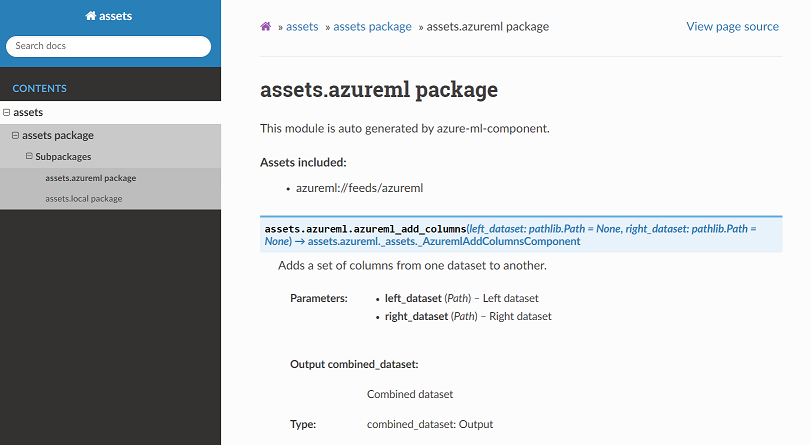
The generated document will locate at build/sphinx/html/index.html, which can be shared to package users. It clearly shows what assets are in the package. It’s an example reference doc is published to readthedocs.
Example doc:
Advanced settings
dsl.generate_package support advanced settings to control the generation behavior.
Generate from multiple sources
Generate package support generate from multiple sources, like: local asset yamls, workspace assets.
dsl.generate_package(
    assets=[
        # from local component yaml specs
        "file:components/**hdi**/module_spec.yaml"
        # from workspace
        "azureml://subscriptions/{subscription_id}/resourcegroups/{resource_group}/workspaces/{workspace_name}",
        # from feed: NOT READY TO USE YET.
        "azureml://feeds/azureml"
    ],
    # User can give generated package a meaningful name
    package_name="assets",
)
Generated pip package folder structure:
assets
    - assets
        - __init__.py
        - assets.yaml
        - local
            - __init__.py
            - _assets.py
            - _workspace.py
        - workspace_name
            - __init__.py
            - _assets.py
            - _workspace.py
        - azureml
            - __init__.py
            - _assets.py
            - _workspace.py
    - doc
        - conf.py
        - index.rst
    - setup.py
Control the generated sub package name
example:
# STEP1: generate/update cool-component-package.
dsl.generate_package(
    # User can generate package with assets from multiple sources
    assets={
        # from workspaces
        # if 'wkw' module file does not exist, dynamic generate and import all components in below workspace
        # if 'wkw' module file already exists and no need to change, skip the generate
        'wkw': [
            "azureml://subscriptions/{subscription_id}/resourcegroups/{resource_group}/workspaces/{workspace_name}",
        ],
        'hdinsight': [
            "file:components/**hdi**/module_spec.yaml"
        ],
        'hugging_face': [
            "azureml://feeds/hugging_face"
        ],
    },
    # User can give generated package/module a meaningful name
    package_name="cool-component-package",
    # Control root folder
    source_directory="../../",
    mode='snapshot'
)

# STEP2: user install the generated package: pip install -e ../../cool-component-package

# STEP3: statically import the generated module in pipeline script
from cool.component.package import wkw, hdinsight
Learn more from dsl.generate_package reference doc.
Generated pip package folder structure:
cool
    - component
        - package
            - __init__.py
            - assets.yaml
            - wkw
                - __init__.py
                - _assets.py
                - _workspace.py
            - hdinsight
                - __init__.py
                - _assets.py
                - _workspace.py
            - hugging_face
                - __init__.py
                - _assets.py
                - _workspace.py
    - doc
        - conf.py
        - index.rst
    - setup.py
Snapshot mode
Snapshot mode will build/download a snapshot of the component in the pip package.
Component from workspace will download snapshot
Component from local yaml will build a snapshot
Example folder structure:
assets
    # component snapshots goes in this folder
    - components
        # hello_world is the component name
        - hello_world
            - main.py
            - component_spec.yaml
    # assets will load from components folder via relative path
    - assets
        - __init__.py
        - assets.yaml
        - local
            - __init__.py
            - _assets.py
            - _workspace.py
setup.py
Refresh files in generated pip package
User may need to regenerate the package & module files.
Force regenerate
Example gen_package.py
from azure.ml.component import dsl

dsl.generate_package(
    assets = {"samples": "file:./components/**/*.yaml"},
    package_name = "asset-library",
    source_directory = ".",
    # force regenerate
    force_regenerate = True
)
Rerun the python script will force regenerate the pip package.
python gen_package.py
force_regenerate controls whether to force regenerate the python module file.
If False, will reuse previous generated file.
If the existing file not valid, raise import error.
However, if the assets specified changed, it will regenerate files.
If True, will always generate and re-import the newly generated file.
NOTE: Component SDK will not delete previous files, just do updates. User may need to manually delete files no longer needed.
Partial refresh
User can also delete the sub package folder, which will be regenerated when it’s referenced.
STEP1: User delete the module file which needs to be updated. E.g. the ‘hugging_face’ directory
STEP2: User rerun pipeline script, module file generates auto-triggered when import the package.
Publish the pip package
The generated package is a normal pip package, user can follow python packaging document to publish it to Pypi or other pip feeds.
Samples
Python version
The example-assets already has an example of package generated by dsl.generate_package.
The example package and reference doc have been published:
Notebook version
This notebook is an example of generating a pip package and import component functions from it.