Define components with python function
Overview
Define component using python function make it easier to iterate quickly by letting you build your component code as a python function and generating the component specification for you. In this document, we will demonstrate how to define components and consume them with python SDK.
| Supported type | Status | Decorator | Note |
|---|---|---|---|
| Command Component | Preview | dsl.command_component | |
| Distributed Component | Preview | dsl.command_component | Specify metadata with distribution. |
Define component
Refer to fields in component specification YAML, the necessary fields of a component when using python SDK include two parts: metadata and interface.
# Metadata: defined in decorator
@dsl.command_component(description='a+b')
# Interface: defined by function parameter
def sum_func(a: int, b: int):
    print(a + b)
Metadata
Metadata is declared on dsl component decorator, all accessible fields are listed in the table below.
| Field name | Type | Description |
|---|---|---|
| name | str | The name of the component. If None is set, function name is used. |
| description | str | The description of the component. If None is set, the doc string is used. |
| version | str | Version of the component, default 0.0.1 |
| display_name | str | Display name of the component. |
| is_deterministic | bool | Specify whether the component will always generate the same result. The default value is None, the component will be reused by default behavior, the same for True value. If False, this component will never be reused. |
| tags | dict | Tags of the component. |
| environment | Union[str, pathlib.path, dict, azure.ml.component.Environment] | Environment config of component, could be a yaml file path, a dict or an Environment object. If None, a default conda with 'azureml-defaults' and 'azure-ml-component' will be used. |
| code | str | The source directory of dsl.component, with default value '.'. i.e. The directory of dsl component file. |
| distribution | dict | Only for Distributed component, e.g. distribution={'type': 'mpi'}. All available types are mpi, Pytorch(or alias: torch.distributed). |
Interface
Interface is defined by the decorated function. Inputs, outputs and parameters are declared by specific annotations as listed below.
| Parameter Type | Annotation |
|---|---|
| Input | azure.ml.component.dsl.types.Input |
| Output | azure.ml.component.dsl.types.Output |
| Parameter | int, str, bool, float or any other types in azure.ml.component.dsl.types except Input and Output |
Sample
The sample below demonstrates how to define a dummy train component.
from pathlib import Path
from uuid import uuid4

from azure.ml.component import dsl
from azure.ml.component.dsl.types import Input, Output, Float

@dsl.command_component(
    name='train_component',
    description='A dummy train component defined by dsl component.',
    version='0.0.1',
    # specify distribution type if needed
    # distribution={'type': 'mpi'},
)
def train_component_func(
    training_data: Input,  # define a input port
    max_epochs: int,  # define a parameter with annotation
    model_output: Output,  # define an output port
    learning_rate: Float(min=0.01, max=0.5) = 0.1,  # define a parameter with default
):
    # do the train and save the trained model as a file into the output folder.
    # here only output a dummy data for demo.
    model = str(uuid4())
    (Path(model_output) / 'model').write_text(model)
Consume component
After define the component function, it can be used directly to create components.
Sample
Let’s see how to consume the train_component_func defined above in dsl.pipeline.
# define a dsl pipeline function
@dsl.pipeline(description='train model', default_compute_target='aml-compute')
def training_pipeline_func(input_data, learning_rate):
    train = train_component_func(
        training_data=input_data,
        max_epochs=5,
        learning_rate=learning_rate)
    return train.outputs

# create a pipeline instance
pipeline = training_pipeline_func(input_data=your_dataset, learning_rate=0.01)

# validate and submit the pipeline
pipeline.validate(workspace=your_workspace)
pipeline.submit(workspace=your_workspace)
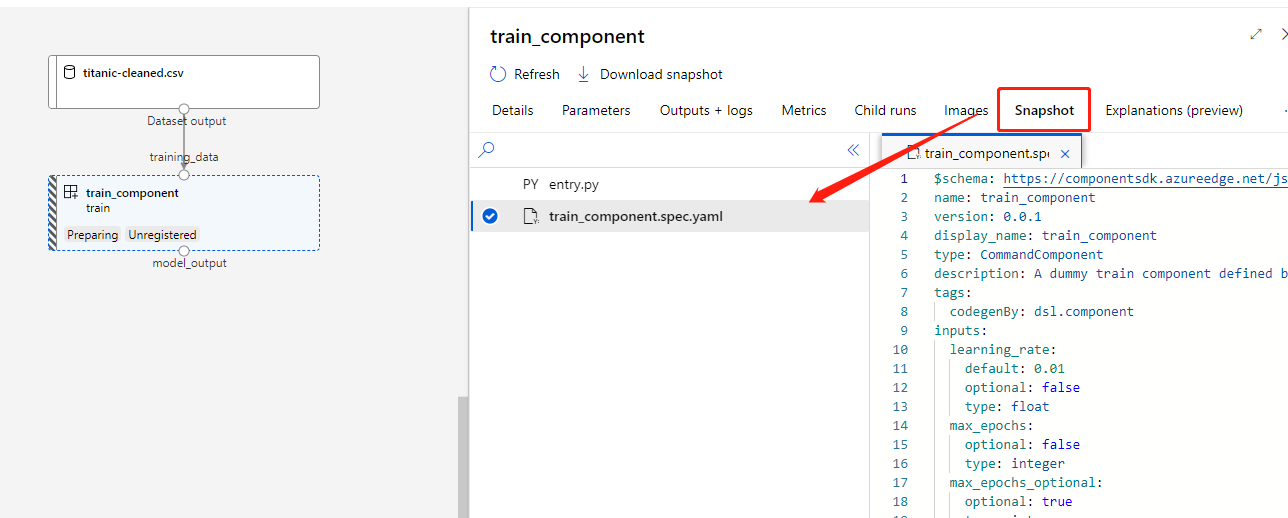
The component snapshot and the generated YAML spec can be found in the pipeline run detail page.
Be aware that you can not pass value to Output types of parameter, which is same as the function returned by Component.from_yaml.
Manage component
The dsl component function can be registered explicitly in your workspace.
Sample
The example below shows how to load or register dsl component function.
component_name = 'train_component'
component_version = "0.0.1"
try:
    # load dsl component with name and version
    registered_train_component_func = Component.load(
        my_workspace, name=component_name, version=component_version
    )
except Exception:
    # register the dsl component
    registered_train_component_func = Component.create(
        train_component_func,
        version=component_version,
        set_as_default=True,
        workspace=my_workspace,
    )
The registered components can be found when using CLI list/show.
Next steps
Learn more about dsl components with our example Jupyter notebook how-to-use-dsl-component.