Compare two pipelines with exporting pipeline to code
Overview
Based on Export existing pipeline to code, we support comparing two pipelines by running az-ml compare command.
With this feature, provided two pipelines will be exported to code in the same parent folder. And user can run relevant CLI command or open local comparing tool (e.g BeyondCompare or Compare Folders to compare differences of the exported code.
[Command line] Generate two pipeline runs code
Supported scenarios
compare pipeline run
Sample
Copy url of two existing pipeline runs.
Run
az-ml compare COPIED_URL1 COPIED_URL2to export two pipeline runs to code.Get all components’ snapshot along with the graph, run
az-ml compare pipeline1 pipeline2 --include-components "*".Get no components’ snapshot, run
az-ml compare pipeline1 pipeline2.Compare in specific path, run with
--path, by default a folder with name of 2 compared pipelines will be created in current directory, eg: “pipeline1-pipeline2”.When same pipeline got exported multiple times, new folder with auto incremental suffix will be created.
Specify
--debugto get more debug info.
The generated code structure looks like this:
pipeline1folder.azuremlfolder: the workspace used in current pipeline.componentsfolder: all components(and snapshots) used in current pipeline.pipelines/subgraphsfolder: all sub graphs used in current pipeline.pipelines/xx.pyfile: the root pipeline.run.pyfile: entry to run current pipeline.
pipeline2folder: same as pipeline1 folder
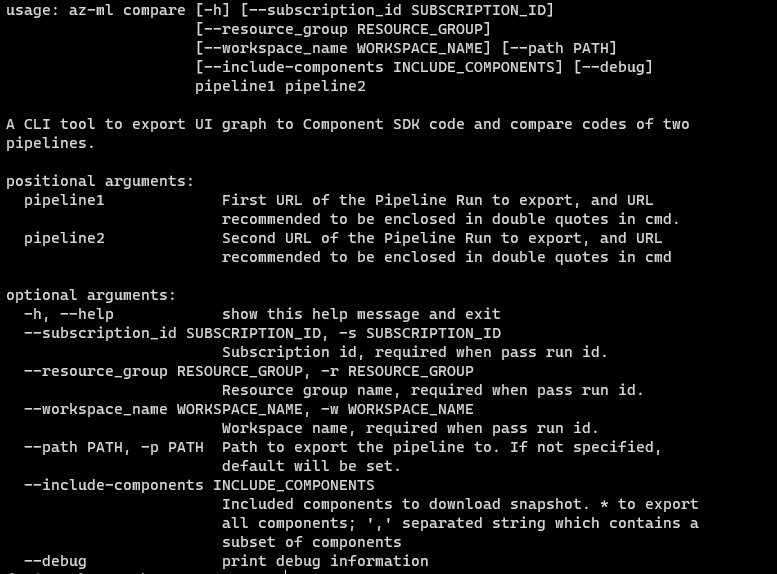
All command line options to generate comparing code:
[Command line] Run CLI command to get differences of the exported code
Sample
-
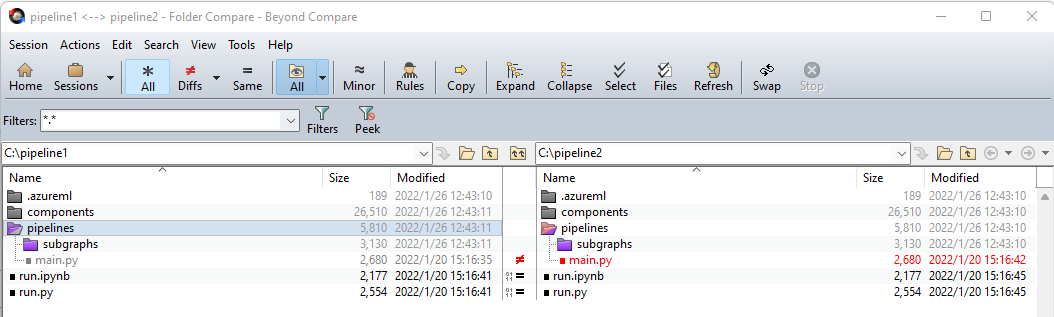
Download BeyondCompare and add path to environment variable.
Run
$target=xx; az-ml compare pipeline1, pipeline2; Bcompare $target/pipelin1 $target/pipeline2in powershell.
VS Code extension: Compare Folders
Install extension Compare Folders.
Run
$target=xx; New-Item $target/.vscode/settings.jsonin powershell.Write settings.json like:
{"compareFolders.folderLeft": "absolute path to pipeline1", "compareFolders.folderRight": "absolute path to pipeline2"}Run
code "target folder"in command palette.