RunSettings
Component.runsettings is used to specify run level settings, including below aspects:
target: compute target
target_selector: instead of set a specific compute target name, user can use a group of condition for smart target selection
resource_layout: gpu/cpu/mem ask and distributed training setting for job
environment_variable: user can pass in dictionary to set environment variables
environment: override environment settings at runtime
priority: set the priority of a scheduler job
parallel/hdinsight/sweep: component type related run settings
User Interface
The example of using runsettings in dsl pipeline:
Method 1: directly set runsettings parameters.
# specify target
component.runsettings.target = "aml-compute"

# optionally specify static settings like resource
component.runsettings.resource_layout.node_count = 2
component.runsettings.resource_layout.process_count_per_node = 2

# optionally specify component type dynamic setting, like parallel component
component.runsettings.parallel.error_threshold = 10
component.runsettings.parallel.mini_batch_size = 200
Method 2: Set runsettings using configure function.
# specify target
component.runsettings.configure(target="aml-compute")

# optionally specify static settings like resource
component.runsettings.resource_layout.configure(node_count=2, process_count_per_node=2)

# optionally specify component type dynamic setting, like parallel component
component.runsettings.parallel.configure(error_threshold=10, mini_batch_size=200)
Method 3: Set runsettings using dictionary type.
Note: this method will initialize the runsettings of which you set dict to, which means all values of current runsettings you set before will be dropped. Thus, if you only want to change one single setting, please use method 1.
# specify resource_layout settings
component.runsettings.resource_layout = {'node_count': 4, "process_count_per_node": 4}

# specify parallel settings of parallel component
component.runsettings.parallel = {"error_threshold": 10, "mini_batch_size": 200}

# specify early termination policy of sweep component
component.runsettings.sweep = {'early_termination': {'policy_type': 'bandit',
                                                     'evaluation_interval': 1,
                                                     'delay_evaluation': 5,
                                                     'slack_amount': 5}}
# With configure function
component.runsettings.configure(
    target="aml-compute",
    resource_layout={
        'node_count': 4, "process_count_per_node": 4
    })

component.runsettings.configure(sweep={
    'early_termination': {
        'policy_type': 'bandit',
        'evaluation_interval': 1,
        'delay_evaluation': 5,
        'slack_amount': 5
    }
}
target
Target refers to the compute where the job is scheduled for execution.
Target is a string which should be the name of a valid compute in user workspace. Target might also be arm resource id in sdk vnext.
component.runsettings.target = "aml-compute"
target_selector
User can use target_selector to specify desired target properties, instead of specifying a target name. Azure ML backend will select a target from a shared set of compute targets, based on user job’s resource requirement and current target load status. So that user job can start in the earliest manner. Note: This feature is still in private preview.
| Name | Type | Required | Default value | Description |
|---|---|---|---|---|
| compute_type | Enum | Yes | - | Compute type that target selector could route job to. Example value: AmlCompute, AmlK8s. |
| instance_types | List |
No | - | List of instance_type that job could use. If no instance_types sre specified, all sizes are allowed. Note instance_types here only contains VM SKU. Example value: ["STANDARD_D2_V2", "ND24rs_v3"]. Note, this field is case sensitive. |
| regions | List |
No | - | List of regions that would like to submit job to. If no regions are specified, all regions are allowed. Example value: ["eastus"]. Currently it only works for ITP. |
| my_resource_only | Bool | No | False | Flag to control whether the job should be sent to the cluster owned by user. If False, target selector may send the job to shared cluster. Currently it only works for ITP. |
| allow_spot_vm | Bool | No | False | Flag to enable target selector service to send job to low priority VM. Currently it only works for ITP. |
Example: only specify compute type and machine sku:
component.runsettings.target_selector.configure(compute_type="AmlCompute", instance_types=["STANDARD_D2_V2"])
# For Itp
component.runsettings.target_selector.configure(compute_type="AmlK8s")
If both target and target_selector specified, target_selector takes effect first.
Note:
To use AmlCompute target selector feature, please contact dawei@microsoft.com to configure your workspace access to a pool of AML compute clusters. This is only available for Microsoft internal customers now.
instance_typeinresource_layoutshould not be used together with target_selector;For a CommandComponent in ITP, in default it won’t be allocated any GPU;
For a DistributedComponent in ITP, in default each node will be allocated all GPUs in one physical node;
resource_layout
resource_layout section controls the number of nodes, CPUs, GPUs the job will consume. Component SDK currently support two ways:
specify node_count: when target is AmlCompute which has a fixed VM SKU and a job instance always consumes a whole node.
specify instance_count: when target type support the instance type concept, e.g. ITP.
specify node_count
| Name | Type | Required | Default value | Description |
|---|---|---|---|---|
| node_count | Int | Yes | - | Number of nodes in the compute target used for running Component. |
| process_count_per_node | Int | No | Number of cores on node | Number of processes executed on each node for running the Distributed Component. |
Example
component.runsettings.resource_layout.configure(
    node_count=2,
    process_count_per_node=2)
# or
component.runsettings.resource_layout.node_count = 2
component.runsettings.resource_layout.process_count_per_node = 2
specify instance_count
| Name | Type | Required | Default value | Description |
|---|---|---|---|---|
| instance_type | String | Yes | - | Instance type to be allocated in the compute target. |
| instance_count | Int | Yes | - | Number of instances to be allocated in the compute target. |
| process_count_per_node | Int | No | Number of cores on node | Number of processes executed on each node for running the Distributed Component. |
Note, this should be used with target or target_selector.
Examples
# select from ITP clusters with target_selector
component0.runsettings.target_selector.configure(compute_type="AmlK8s", instance_types=['ND24rs_v3'])
component0.runsettings.resource_layout.configure(instance_count=2)

# choose a specific ITP cluster with target
component1.runsettings.target = 'nd24-compute'
component1.runsettings.resource_layout.configure(instance_type='ND24rs_v3_1GPU',instance_count=2)
Instance type
Instance type is an alias to represent the resource ask for a job. Currently, it could be a VM SKU, or a VM SKU with the number of required GPUs/CPUs.
For compute target like ITP, there can be multiple VM SKUs available for selection.
And for large VM SKU, to achieve higher resource utilization, we would like to allocate a slice of the node, so multiple job instances can share the same node simultaneously.
Naming convention for the instance_type which represent a slice of the node
| Type | Convention | Examples |
|---|---|---|
| GPU job | VMSKU_{N}GPU (N=1 or even number) | ND24rs_v3_1GPU, ND24rs_v3_2GPU, ND24rs_v3_4GPU, ND24rs_v3_8GPU |
| CPU job | VMSKU_{N}CPU (N=1 or even number) | E32a_v4_1CPU, E32a_v4_2CPU, E32a_v4_4CPU, ... ,E32a_v4_32CPU |
Currently, instance_types for slicing only works for CommandComponennt and ParallelComponent in ITP. AmlCompute will run jobs with all cpus/gpus available on compute. Each node of a DistributedComponent job in ITP will also occupy all the resource in one physical node.
For ITP, you can find the available SKUs in this link.
environment_variables
environment_variables can be used to specify environment variables to be passed. It is a dictionary of environment name to environment value mapping. User can use this to adjust some component runtime behavior which is not exposed as component parameter, e.g. enable some debug switch.
Note: Only a subset of component types support this like: Command, Distributed. Other component types like DataTransfer, HDInsight component does not support this. For HDInsight,
hdinsight.confrunsetting can be used as a replacement.
Example
component.runsettings.environment_variables = {'EXAMPLE_ENV_VAR': 'example_value'}
environment
Environment runsettings allow users to override environment at runtime. This makes it easier to run the same component on different environments.
Environment contains these parts Docker, Conda, OS, Environment name and version. You can override any of them or the entire environment. It’s recommended to use environment name and version to override environment at runtime.
For more details about AML environments, see Environments.
Override entire environment
We support two ways to do this:
Load from YAML file (Only local file is supported currently)
Use curated environment
For more information about curated environments, see create and manage reusable environments
Example
from azure.ml.component.environment import Environment

# environment from local environment.yaml
my_env = Environment(file="/path/to/environment.yaml")

# or specify environment with curated AML environment
my_env = Environment(name="AzureML-Designer", version="19")

component.runsettings.environment = my_env
Example environment.yaml:
docker:
  image: mcr.microsoft.com/azureml/openmpi3.1.2-ubuntu18.04:20210531.v1
conda:
  conda_dependencies:
    name: project_environment
    channels:
    - conda-forge
    dependencies:
    - pip=20.2
    - python=3.6.8
    - pip:
      - azureml-defaults
      - azure-ml-component
os: Linux
Learn more on how to write this YAML file, see environment specs
Override environment by fields
You can override environment by setting Docker, Conda and OS.
For Docker, we support:
From image, like
mcr.microsoft.com/azureml/openmpi3.1.2-ubuntu18.04From dockerfile
For Conda, we also support:
From pip requirements file
From YAML file (or YAML string) which defines conda settings
For how to write this YAML file, see conda specs
For OS, we support two options (case-sensitive) as:
Linux
Windows
Note: only local files are supported for settings in this section.
Example
from azure.ml.component.environment import Docker, Conda

# docker with image
my_docker = Docker(image="mcr.microsoft.com/azureml/openmpi3.1.2-ubuntu18.04")

# docker with docker file
my_docker = Docker(file="/path/to/docker/.dockerfile")

# conda through pip requirements
my_conda = Conda(pip_requirements_file="/path/to/conda/pip_requirement.txt")

# conda through conda.yaml
my_conda = Conda(conda_file="/path/to/conda/conda.yaml")

# conda through YAML string
my_conda = """
name: project_environment
dependencies:
- python=3.6.2
- pip:
  - azureml-defaults
"""

# override docker, conda and OS
component.runsettings.environment.configure(docker=my_docker, conda=my_conda, os="Windows")
docker_configuration
User can specify docker configurations using this docker_configuration runsetting.
| Name | Type | Required | Default value | Description |
|---|---|---|---|---|
| use_docker | Bool | No | True | Specifies whether the environment to run the experiment should be Docker-based. Note: Only takes effect when using windows Amlcompute clusters and local, because linux clusters require that jobs running inside Docker containers, the backend will override the value to be True. When user_docker=False, experiments will run on the conda environment hosted by the VM, and the environment settings of components will be ignored. |
| shared_volumes | Bool | No | True | Indicates whether to use shared volumes. Note: Set to False if necessary to work around shared volume bugs on Windows. |
| shm_size | str | No | 2g | The size of the Docker container's shared memory block. |
| arguments | List[str] | No | [] | Extra arguments to the Docker run command. The extra docker container options like --cpus=2, --memory=1GB. Please refer to Docker document for more docker command arguments. |
Example
component.runsettings.docker_configuration.use_docker = True
component.runsettings.docker_configuration.shared_volumes = True
component.runsettings.docker_configuration.arguments = ['--cpus=2', '--memory=1GB']
component.runsettings.docker_configuration.shm_size = '4g'
priority
Priority runsetting specifies the priority of one scheduler job, which is an integer. Note: This feature is still in private preview.
| Compute | Type | Note |
|---|---|---|
| Aml Compute | int: [1, 1000] | Any value larger than 1000 or less than 1 will be treated as 1000. |
| AmlK8s Compute | int: [100, 200] | Any value larger than 200 or less than 100 will be treated as 200. |
Example
component.runsettings.priority = 100
timeout_seconds
Timeout seconds is an integer refers to the maximum time in seconds the job is allowed to run. Once this limit is reached, the system will cancel the job.
Example
component.runsettings.timeout_seconds = 600
parallel
This section contains specific settings for Parallel component.
| Name | Type | Required | Default value | Description |
|---|---|---|---|---|
| node_count | Int | Yes | - | Number of nodes in the compute target used for running the Parallel component. |
| process_count_per_node | Int | No | Number of cores on node | Number of processes executed on each node. |
| error_threshold | Int | No | -1 | The number of file failures for the input FileDataset that should be ignored during processing. If the error count goes above this value, then the job will be aborted. Error threshold is for the entire input and not for individual mini-batches sent to run() method. The range is [-1, int.max]. -1 indicates ignoring all failures during processing. |
| mini_batch_size | String | No | 10 | For FileDataset input, this field is the number of files a user script can process in one run() call. For TabularDataset input, this field is the approximate size of data the user script can process in one run() call. Example values are 1024, 1024KB, 10MB, and 1GB. (optional, default value is 10 files for FileDataset and 1MB for TabularDataset.) |
| logging_level | String | No | INFO | A string of the logging level name, which is defined in 'logging'. Possible values are 'WARNING', 'INFO', and 'DEBUG'. |
| run_invocation_timeout | Int | No | 60 | Timeout in seconds for each invocation of the run() method. |
| run_max_try | Int | No | 3 | The number of maximum tries for a failed or timeout mini batch. A mini batch with dequeue count greater than this won't be processed again and will be deleted directly. |
| partition_keys | JsonString or List |
No | None | Please refer to PRS docs for more details. |
| version | String | No | v1 | Please refer to PRS docs for more details. |
For more questions on Parallel component, refer to ParallelRunConfig docs or contact PRS team.
Examples
component.runsettings.parallel.configure(
    error_threshold=-1,
    mini_batch_size=10,
    logging_level="INFO",
    run_invocation_timeout=60,
    run_max_try=3)
# or
component.runsettings.parallel.error_threshold = -1
component.runsettings.parallel.mini_batch_size = 10
hdinsight
This section contains specific settings for HDInsight component.
| Name | Type | Required | Description |
|---|---|---|---|
| queue | String | No | The name of the YARN queue to which submitted. |
| driver_memory | String | No | Amount of memory to use for the driver process. It's the same format as JVM memory strings. Use lower-case suffixes, e.g. k, m, g, t, and p, for kibi-, mebi-, gibi-, tebi-, and pebibytes, respectively. Example values are 10k, 10m and 10g. |
| driver_cores | Int | No | Number of cores to use for the driver process. |
| executor_memory | String | No | Amount of memory to use per executor process. It's the same format as JVM memory strings. Use lower-case suffixes, e.g. k, m, g, t, and p, for kibi-, mebi-, gibi-, tebi-, and pebibytes, respectively. |
| executor_cores | Int | No | Number of cores to use for each executor. |
| number_executors | Int | No | Number of executors to launch for this session. |
| conf | Dictionary |
No | Spark configuration properties. |
| name | String | No | The name of this session. |
Please refer to spark docs for default values of some fields.
Examples
component.runsettings.hdinsight.configure(
    name="session_name",
    queue="default",
    driver_memory="1g",
    driver_cores=4,
    executor_memory="4g",
    executor_cores=4,
    number_executors=4,
    conf={
        "spark.yarn.maxAppAttempts": "1",
        "spark.yarn.appMasterEnv.PYSPARK_PYTHON": "/usr/bin/anaconda/envs/py35/bin/python3",
        "spark.yarn.appMasterEnv.PYSPARK_DRIVER_PYTHON": "/usr/bin/anaconda/envs/py35/bin/python3"
    }
)
# or
component.runsettings.hdinsight.name = "session_name"
component.runsettings.hdinsight.conf = {
        "spark.yarn.maxAppAttempts": "1",
        "spark.yarn.appMasterEnv.PYSPARK_PYTHON": "/usr/bin/anaconda/envs/py35/bin/python3",
        "spark.yarn.appMasterEnv.PYSPARK_DRIVER_PYTHON": "/usr/bin/anaconda/envs/py35/bin/python3"
    }
FAQ
How to get the absolute path of py_files in code?
If you use Python, you can get it by this way:
from pyspark.sql import SparkSession

# Get the spark session
spark = SparkSession.builder.getOrCreate()
spark_conf = spark.sparkContext.getConf()
py_files = spark_conf.get('spark.yarn.dist.pyFiles')
scope
This section contains specific settings for Scope Component.
| Name | Type | Required | Description |
|---|---|---|---|
| adla_account_name | String | Yes | the ADLA account name to use for the scope job |
| scope_param | String | No | nebula command used when submit the scope job |
| custom_job_name_suffix | String | No | optional string to append to scope job name |
| priority | Int | No | scope job priority. If set priority in scope_param, will override this setting |
| auto_token | Int | No | a predictor for estimating the peak resource usage of scope job |
| tokens | Int | No | standard token allocation |
| vcp | Float | No | standard VC percent allocation, a floating point between 0 and 100 |
Notes:
auto_tokenindicates the maximum token you would like to allocate to the scope job. If the AutoToken feature predicate token counts larger than the maximum token specified by the user, the system will fall back to the maximum token value.Please don’t specify
auto_token,tokensandvcpat the same time, they have the same effect.Specifying
auto_token,tokensandvcpin scope_param or runsettings is equivalent.
Examples
component.runsettings.scope.configure(
    adla_account_name='adla_account_name',
    scope_param='-tokens 50',
    custom_job_name_suffix='component_sdk_test',
    tokens=50) # auto_token=50, vcp=20
# or
component.runsettings.scope.adla_account_name='adla_account_name'
component.runsettings.scope.scope_param='-tokens 50'
component.runsettings.scope.custom_job_name_suffix='component_sdk_test'
component.runsettings.scope.tokens=50
# component.runsettings.scope.auto_token=50
# component.runsettings.scope.vcp=20
Work with pipeline parameters
General
Runsettings of components that are defined inside a pipeline can be specified using pipeline parameter, thus components could run with different runsettings according to different pipeline parameters.
The following example demonstrates how to assign values to runsettings with different data types using pipeline parameters.
@dsl.pipeline(name='sample_pipeline')
def sample_pipeline(target_name, instance_count, instance_type, json_string) -> Pipeline:
    component = component_function()
    # specify target with target name string
    component.runsettings.target = target_name
    # specify int type parameter
    component.runsettings.resource_layout.instance_count = instance_count
    # specify str type parameter
    component.runsettings.resource_layout.instance_type = instance_type
    # specify str type parameter with formatted string literals
    # component.runsettings.resource_layout.instance_type = f'{instance_type}'
    # specify json string type parameter
    component.runsettings.environment_variables = json_string

pipeline = sample_pipeline(target_name='aml-compute',
                           instance_count=2,
                           instance_type='STANDARD_D2_V2',
                           environment_variables='{"pipeline_name": "sample_pipeline"}')
Note that parameter with json_string type only accept string or formatted string literals now if using pipeline parameter,
dict or list with pipeline parameter inside like {'pipeline_name': pipeline_name_var} will not be accepted.
Specify runsettings value with pipeline parameter is now available for all runsettings when authoring pipeline from Component SDK.
Only a subset of runsettings with linked parameters could take values correctly from pipeline parameters when resubmit from pipeline run. They are listed in the table below.
| Section | Name | Note |
|---|---|---|
| (root) | target | HDInsightComponent, DataTransferComponent is not supported. |
| resource_layout | node_count | Only DistributedComponent and ParallelComponent is supported. |
| instance_count | Only DistributedComponent is supported. | |
| process_count_per_node | Only DistributedComponent and ParallelComponent is supported. | |
| parallel | error_threshold | |
| logging_level | ||
| mini_batch_size | ||
| partition_keys | ||
| run_invocation_timout | ||
| run_max_try | ||
| scope | adla_account_name | |
| scope_param | ||
| custom_job_name_suffix |
For more information or any other requirement please contact us.
Additional notes for sweep component
There are some additional notes when specify hyperparameter for sweep component.
You may see the sweep component hyperparameters from Designer portal demonstrated as follows:
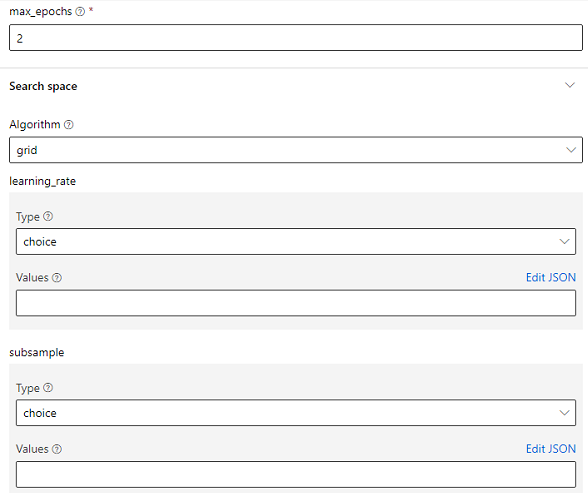
We support the use of pipeline parameter to replace each input box completely when authoring a pipeline from Component SDK.
For example, replace the subsample-values with a new list via pipeline parameter.
@dsl.pipeline(name='sweep_pipeline')
def sweep_pipeline_func(choice_values) -> Pipeline:
    step = sweep_component_func(training_data=dataset,
                                max_epochs=2,
                                subsample={
                                    "type": "choice",
                                    "values": choice_values
                                })
    ...
pipeline = sweep_pipeline_func([0.1, 0.2, 0.3])
Change algorithm value to random and there are many kinds of types with different structure for hyperparameters, let’s choose uniform:
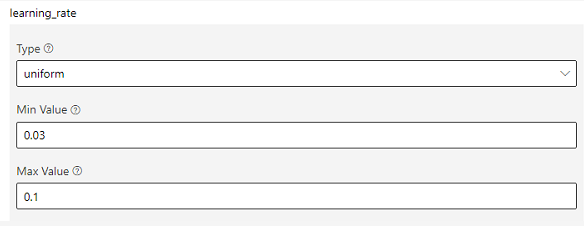
The original Values field changed to a Min Value and a Max Value. Replace the two values with pipeline parameter again:
@dsl.pipeline(name='sweep_pipeline')
def sweep_pipeline_func(min_value, max_value) -> Pipeline:
    step = sweep_component_func(training_data=dataset,
                                max_epochs=2,
                                subsample={
                                    "type": "uniform",
                                    "min_value": min_value,
                                    "max_value": max_value
                                })
    ...
pipeline = sweep_pipeline_func(0.1, 0.5)
The way of setting value of any other type hyperparameter is same as before, write the dict structure of the hyperparameter and replace the values with pipeline parameter.
Pipeline level RunSettings
Pipeline.runsettings is used to specify run level settings for Pipeline, including below aspect:
priority: set default priority at pipeline level
pipeline priority
Pipeline priority provides a solution to set cosmos job default priority at pipeline level. There are several kinds of Component has priority setting (only Scope is supported currently):
| Component Type(s) | AML Default value | Range (highest to lowest) | Comments |
|---|---|---|---|
| Scope Component | 1000 | [0, 3999] | Scope job's priority in Cosmos |
Note: Pipeline level priority has higher priority than system default value, but lower than node level priority.
Example
# set with strong type intellisense
pipeline.runsettings.priority.scope = 900
# set with dynamic dict
pipeline.runsettings.priority = {'scope': 900}