Pipeline
What are Azure Machine Learning Pipelines?
An Azure Machine Learning pipeline is an independently executable workflow of a complete machine learning task. Azure Machine Learning pipelines help you build, optimize, and manage machine learning workflows with simplicity, repeatability and quality assurance.
These benefits become significant as soon as your machine learning project moves beyond pure exploration and into iteration. Even simple one-step pipelines can be valuable. Machine learning projects are often in a complex state, and it can be a relief to make the precise accomplishment of a single workflow a trivial process.
Building pipelines with the Component SDK
In the Component SDK, a pipeline can be defined as a function with @dsl.pipeline decorator imported from azure.ml.component to declare itself an Azure
Machine Learning pipeline.
There are one or more Component objects in the pipeline, and a Pipeline runs as part of an Experiment.
An Azure Machine Learning pipeline is associated with an Azure Machine Learning workspace and a Component is associated with a compute target available within that workspace. For more information, see Create and manage Azure Machine Learning workspaces in the Azure portal or What are compute targets in Azure Machine Learning?.
A simple pipeline
This snippet shows the objects and calls needed to create and run a simple pipeline with only one component inside.
from azureml.core import Dataset, Workspace
from azure.ml.component import dsl, Component, Pipeline

# get workspace
ws = Workspace.from_config()
# prepare dataset
sample_dataset = Dataset.get_by_name(ws, name='sample_dataset_name')
# load named component which created in workspace
# The component with name `azureml://Execute Python Script` is a built-in component.
execute_python_script_component = Component.load(ws, name='azureml://Execute Python Script')

# define the sample pipeline
@dsl.pipeline(name='sample-pipeline',
              description='a sample pipeline',
              default_compute_target='aml-compute')
def sample_pipeline() -> Pipeline:
    # instantiate the component
    component = execute_python_script_component(dataset1=sample_dataset)
    # add comment on component
    component.comment = 'execute script with sample dataset'
    return component.outputs

# create and validate the pipeline
pipeline = sample_pipeline()
pipeline.validate()

# submit the pipeline
pipeline.submit()
Read more about load & parameterize a component in component
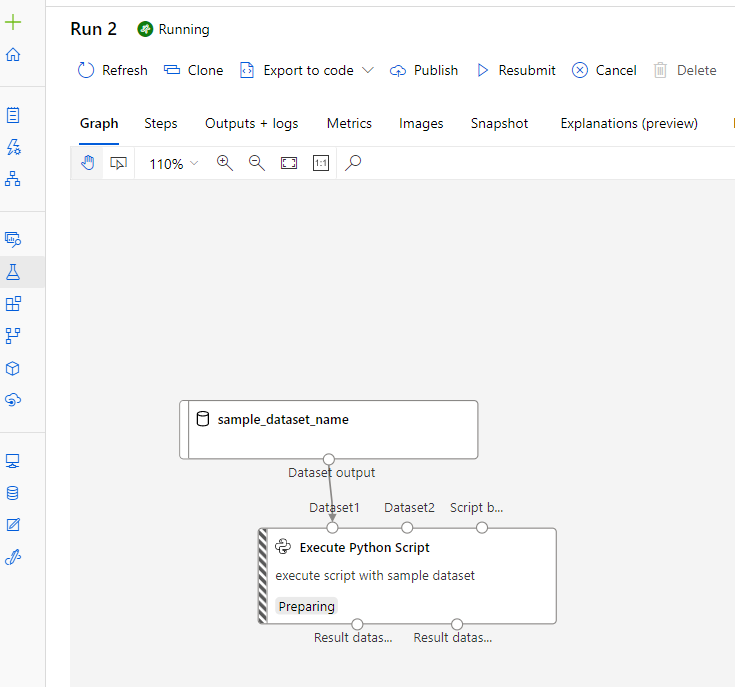
After validation and submission we can see the graph in Azure ML Studio UI as follows.
A multi-layer pipeline
A multi-layer pipeline is compounded from multiple components or pipelines. The snippet below shows how to create and run a multi-layer pipeline.
First, define a training pipeline include train, score, evaluate component.
from azureml.core import Dataset, Workspace
from azure.ml.component import dsl, Component, Pipeline

# get workspace
ws = Workspace.from_config()
# prepare dataset
train_data = Dataset.get_by_name(ws, name='train_data')
test_data = Dataset.get_by_name(ws, name='test_data')
# load workspace independent components from local yaml spec as anonymous component
train_component_func = Component.from_yaml(yaml_file='./components/get-started-train/train.yaml')
score_component_func = Component.from_yaml(yaml_file='./components/get-started-score/score.yaml')
eval_component_func = Component.from_yaml(yaml_file='./components/get-started-eval/eval.yaml')
compare_component_func = Component.from_yaml(yaml_file='./components/get-started-compare-two-models/compare2.yaml')

# define the training pipeline
@dsl.pipeline(name='A_training_pipeline_including_train_score_eval',
              description='train model and evaluate model performance')
def training_pipeline(learning_rate) -> Pipeline:
    train = train_component_func(
        training_data=train_data,
        max_epochs=5,
        learning_rate=learning_rate)
    # add comment with learning rate on component
    train.comment = f'training with learning_rate {learning_rate}'
    # connect two components by setting the output of one as the input of the other.
    score = score_component_func(
        model_input=train.outputs.model_output,
        test_data=test_data)

    eval = eval_component_func(scoring_result=score.outputs.score_output)
    return {'model': train.outputs.model_output,
            'result': eval.outputs.eval_output}
Define a root pipeline to compare the results of two training sub-pipelines with different learning_rate.
@dsl.pipeline(name='A_training_pipeline_including_train_score_eval',
              description='train model and evaluate model performance',
              default_compute_target = 'aml-compute')
def root_pipeline() -> Pipeline:
    # training pipeline 1 with learning rate 0.01
    training_pipeline1 = training_pipeline(0.01)
    # training pipeline 2 with learning rate 0.02
    training_pipeline2 = training_pipeline(0.02)
    compare_component = compare_component_func(model1=training_pipeline1.outpus.model,
                                               eval_result1=training_pipeline1.outputs.result,
                                               model2=training_pipeline2.outpus.model,
                                               eval_result2=training_pipeline2.outputs.result)
    return compare_component.outputs

# create and validate the pipeline
pipeline = root_pipeline()
# Specify the workspace for workspace independent component when validating the pipeline.
pipeline.validate(workspace=ws)

# Specify the workspace for workspace independent component when submitting the pipeline.
pipeline.submit(workspace=ws)
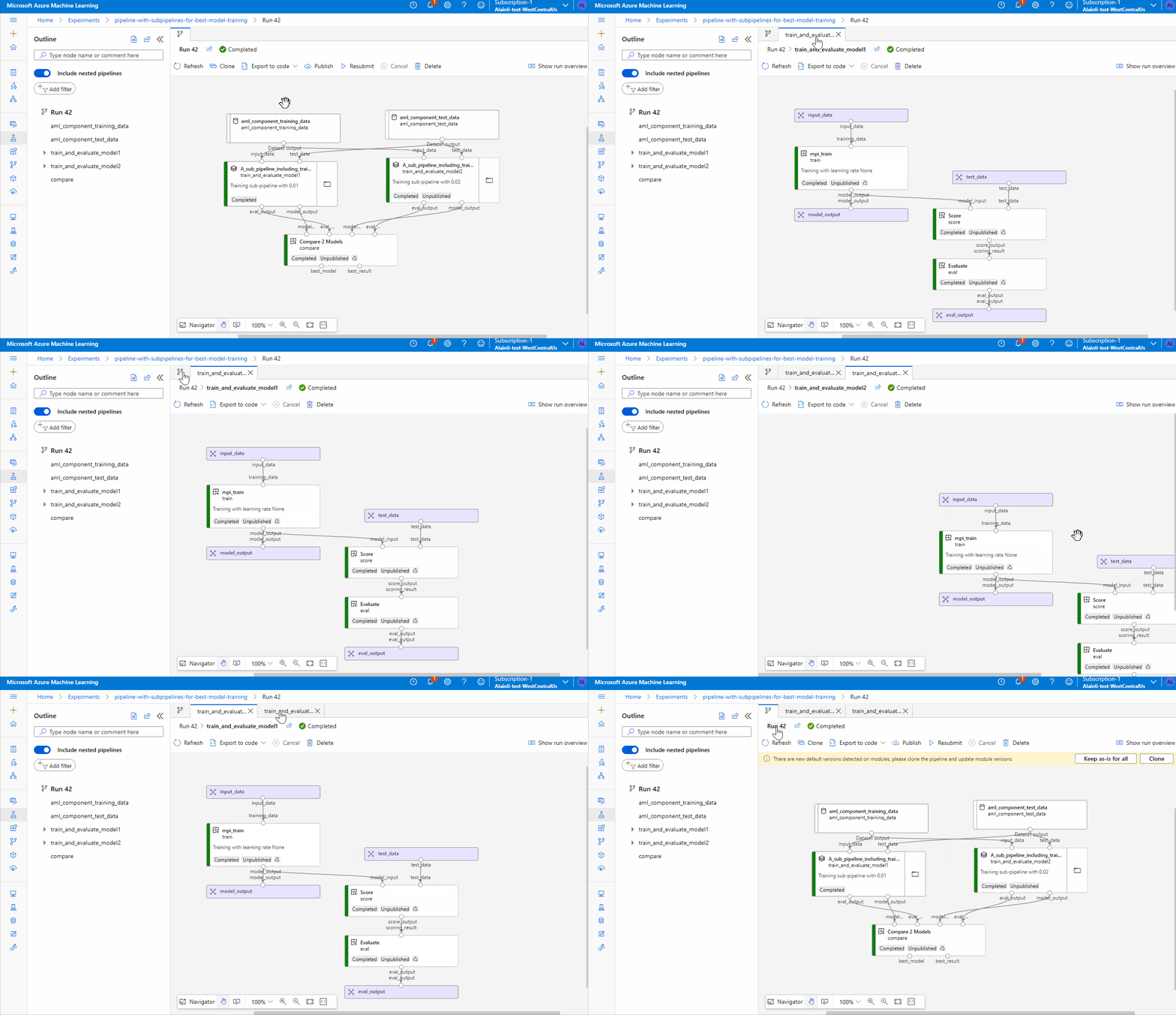
Visualize pipeline run graph in portal:
Intellisense for dsl.pipeline output
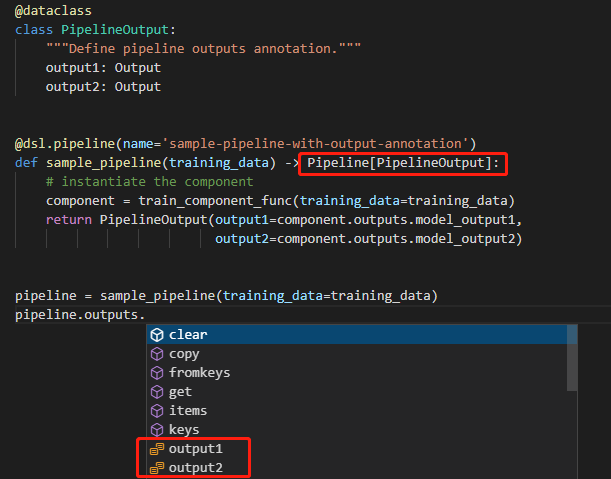
This snippet shows how to define the pipeline output annotation. When defining the pipeline function, you can add the output data class as the generic type of the pipeline, e.g. -> Pipeline[PipelineOutput]. In your IDE python editor, pipeline outputs can support intellisense.
from azure.ml.component import dsl, Pipeline
from azure.ml.component.dsl.types import Input, Output
from pathlib import Path
from uuid import uuid4
from dataclasses import dataclass


@dsl.command_component(name='train_component')
def train_component_func(
    training_data: Input,  # define a input port
    model_output1: Output,  # define an output port
    model_output2: Output,  # define an output port
):
    model = str(uuid4())
    (Path(model_output1) / 'model').write_text(model)
    (Path(model_output2) / 'model').write_text(model)


@dataclass
class PipelineOutput:
    """Define pipeline outputs annotation."""
    output1: Output
    output2: Output


@dsl.pipeline(name='sample-pipeline-with-output-annotation')
def sample_pipeline(training_data) -> Pipeline[PipelineOutput]:
    # instantiate the component
    component = train_component_func(training_data=training_data)
    return PipelineOutput(output1=component.outputs.model_output1,
                          output2=component.outputs.model_output2)
Intellisense of pipeline output in VScode.
Key advantages
| Key advantage | Description |
|---|---|
| Unattended runs | Schedule steps to run in parallel or in sequence in a reliable and unattended manner. Data preparation and modeling can last days or weeks, and pipelines allow you to focus on other tasks while the process is running. |
| Heterogenous compute | Use multiple pipelines that are reliably coordinated across heterogeneous and scalable compute resources and storage locations. Make efficient use of available compute resources by running individual pipeline steps on different compute targets, such as HDInsight, GPU Data Science VMs, and Databricks. |
| Re-usability | Create pipeline templates for specific scenarios, such as retraining and batch-scoring. Trigger published pipelines from external systems via simple REST calls. |
| Tracking and versioning | Instead of manually tracking data and result paths as you iterate, use the pipelines SDK to explicitly name and version your data sources, inputs, and outputs. You can also manage scripts and data separately for increased productivity. |
| Modularity | Separating areas of concerns and isolating changes allows software to evolve at a faster rate with higher quality. |
| Collaboration | Pipelines allow data scientists to collaborate across all areas of the machine learning design process, while being able to concurrently work on pipeline steps. |
Next steps
Azure Machine Learning pipelines are a powerful facility that begins delivering value in the early development stages.
The value increases as the team and project grows. This article has explained how pipelines are specified with
the Component SDK. You’ve seen some simple source code and been introduced to a few of the dsl.pipeline decorator that are available.
You should have a sense of when to use Azure Machine Learning pipelines and how Azure runs them.
Learn how to create your first pipeline with our example Jupyter notebooks get-started.
Learn how to use visualization in Jupyter notebook for better developer experience.
Learn how to create a pipeline with sub pipeline.
See the SDK reference docs for component, runsettings and pipeline parameter.