PipelineParameter
What is PipelineParameter?
PipelineParameter allow user dynamically running pipeline experiments with different inputs and parameters without any code change.
Supported type
| Type | Description |
|---|---|
| int | Python built-in numeric type |
| str | Python built-in text sequence type |
| bool | Python built-in truth value testing type |
| float | Python built-in numeric type |
| Dataset | Azureml dataset type like FileDataset |
Use PipelineParameter
PipelineParameter as a component input/parameter
In the sample pipeline function below, pipeline parameters are:
input_data - the original dataset
replacement_value - a string value used to replace missing values
# prepare dataset and component function

# create a FileDataset
titanic_dataset = Dataset.File.from_files('https://dprepdata.blob.core.windows.net/demo/Titanic.csv')
# get 'Clean Missing Data' component function
clean_missing_data_func = Component.load(workspace, name='azureml://Clean Missing Data')

# define a pipeline function with parameter.
@dsl.pipeline(name='sample_pipeline_with_pipeline_parameter',default_compute_target='aml-compute')
def sample_pipeline(input_data, replacement_value) -> Pipeline:
    # clean missing data of our input dataset
    clean_missing_data = clean_missing_data_func(
        dataset=input_data,
        columns_to_be_cleaned='["AllColumns"]',
        minimum_missing_value_ratio=0.0,
        maximum_missing_value_ratio=1.0,
        cleaning_mode='Custom substitution value',
        replacement_value=replacement_value,
        generate_missing_value_indicator_column=False)
    return clean_missing_data.outputs

# create a pipeline instance with input=titanic_dataset and replacement_value='0'
pipeline = sample_pipeline(input_data=titanic_dataset, replacement_value='0')
# submit pipeline run
pipeline.submit()
*Parameters defined by user function decorated with dsl.pipeline() will be transformed into PipelineParameter type. If there are nested pipelines decorators, only the parameters of the outermost user function will be transformed into PipelineParameter.
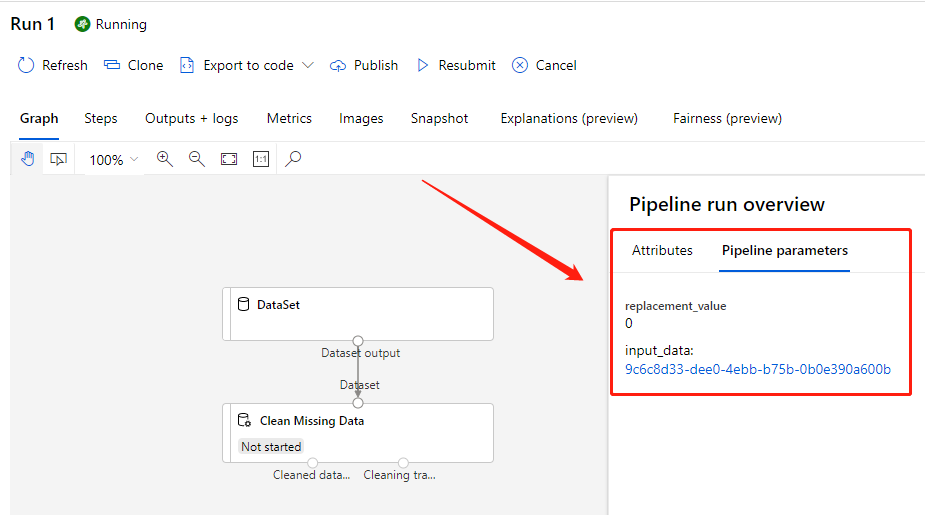
Open the run link returned by submit() function, you will see the pipeline parameters replacement_value with ‘0’ and input_data with
a link.
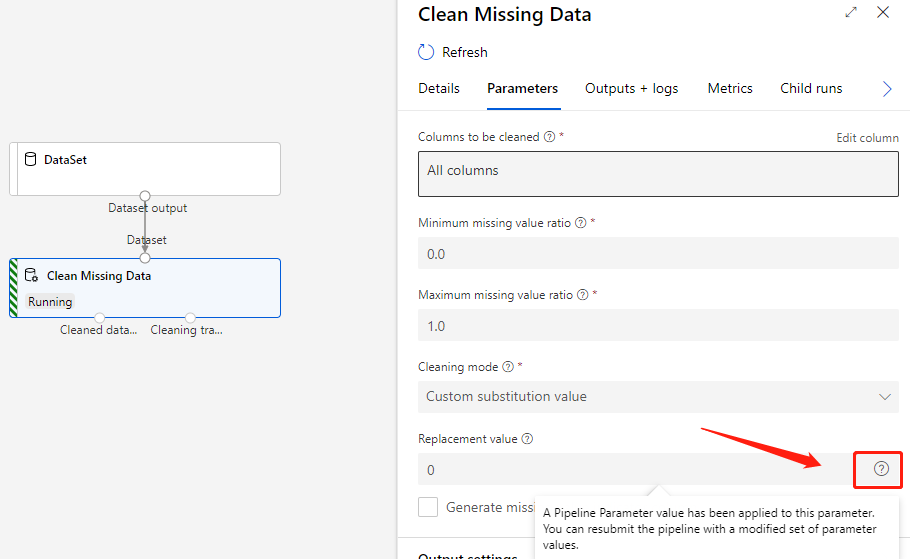
Click the Clean Missing Data component, you can see the input box of parameter replacement_value followed by a
question mark, which indicate a PipelineParameter value has been applied to the component’s parameter.
PipelineParameter as substrings of a component parameter
PipelineParameter can be used as substrings of a string parameter.
Suggest we have a pipeline with PipelineParameter param_name param_value, we’d like to format them as a json string
then pass it to the component, the pipeline can be defined as follow.
@dsl.pipeline(name="pipeline")
def pipeline(param_name, param_value) -> Pipeline:
    print_string_component_func(
        string_parameter='{{"name": "{0}", "value": "{1}"}}'.format(param_name, param_value))

print_string_pipeline = pipeline('my_param', '1/25/2021')
print_string_pipeline.submit()
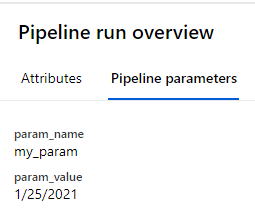
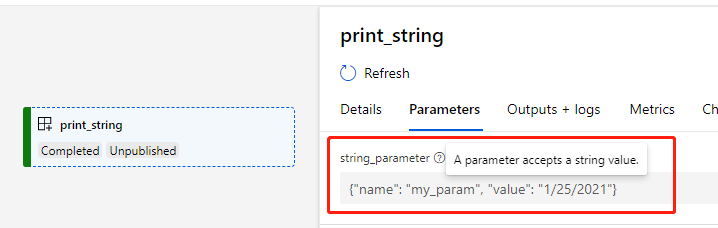
Submit the pipeline, we can see our two pipeline parameters param_name=my_param, param_value=1/25/2021.
And the string_parameter of component has been formatted just like what we want.
Submit with PipelineParameter
Submit pipeline with PipelineParameter via Component SDK
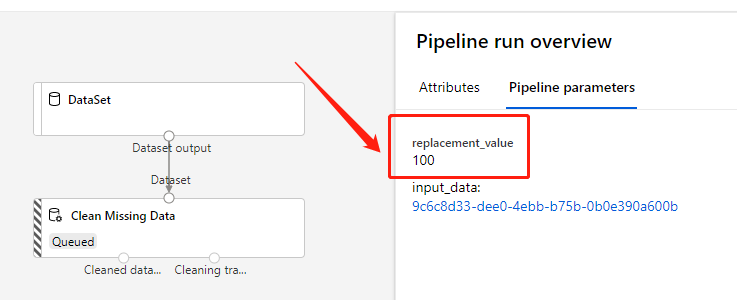
Submit the pipeline created above with replacement_value values ‘100’:
# define pipeline parameters with new replacement value
pipeline_parameters = {'replacement_value': '100'}

# submit run with pipeline parameters
pipeline.submit(pipeline_parameters=pipeline_parameters)
The replacement_value display ‘100’ now and the input_data is same as before.
Resubmit run with PipelineParameter
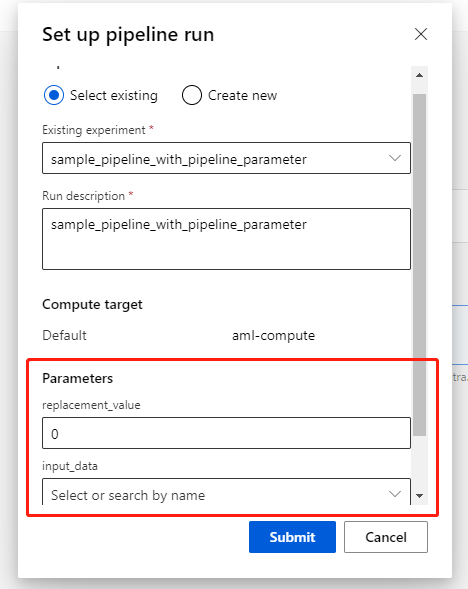
Click the Resubmit button on the pipeline run page, you can set up parameters if the run has PipelineParameter.
Publish run with PipelineParameter
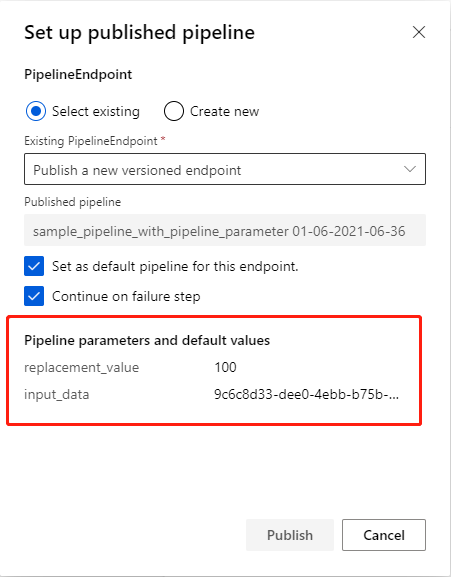
PipelineParameter also have effect on pipeline endpoint, and you can set them up if submit run with endpoint.
Click Publish button on the pipeline run page, pipeline parameters and default values will be display if there exists.
PipelineEndpoint SDK support will be public available later.
Use Parameter Group
What is ParameterGroup?
ParameterGroup is used to group a set of component parameters and make component configuration easier.
Define ParameterGroup using dsl.parameter_group decorator
The decorator on class will:
Infer and save dsl.type from annotation for data in class
Generate
__init__and__repr__function
Sample
# A sample: define parameter group
from azure.ml.component import dsl

@dsl.parameter_group
class ComputeSettings:
    cpu_cluster: str
    process_count_per_node: int = 1
    node_count: int = 1

help(ComputeSettings.__init__)
Help on function __init__ in module azure.ml.component.dsl.types:
__init__(self, cpu_cluster:str, process_count_per_node:int=1, node_count:int=1) -> None
Restrictions:
Group cannot be empty
Parameter name cannot start with “_”
All group member name must be public and MUST have annotation
Customer class definition should follow non-default parameter follows default parameter rule
Link and assign ParameterGroup in dsl.pipeline
Sample
# prepare dataset and component function
from azureml.core import Dataset
from azure.ml.component import Component
# create a FileDataset
titanic_dataset = Dataset.File.from_files('https://dprepdata.blob.core.windows.net/demo/Titanic.csv')
# get 'Clean Missing Data' component function
train_component_func = Component.load(workspace, name='azureml://Clean Missing Data')

# define a pipeline with parameter group
@dsl.pipeline(name = 'training_pipeline',
              description = 'A sub pipeline including train/score/eval',
              default_compute_target = cluster_name)
def training_pipeline(input_data, learning_rate, compute: ComputeSettings) -> Pipeline:
    train = train_component_func(
        training_data=input_data,
        max_epochs=5,
        learning_rate=learning_rate)
    # specify component runsettings by using `compute` parameter group
    train.runsettings.target = compute.cpu_cluster
    train.runsettings.resource_layout.configure(process_count_per_node=compute.process_count_per_node,
                                                node_count=compute.node_count)
# create a parameter group
compute_setting = ComputeSettings(cpu_cluster='aml-compute', node_count=2)
# create pipeline instance
pipeline = training_pipeline(titanic_dataset, 0.01, compute_setting)
Restrictions:
Group type parameter must have explicit type annotation in each of all dsl.pipeline() function
Consume ParameterGroup in PipelineComponent
Firstly, create the training_pipeline above as pipeline component.
# create the pipeline component
training_pipeline_component_func = Component.create(training_pipeline, version='0.0.1')
# see the function help doc
help(training_pipeline_component_func)
The pipeline component function definition in help output:
[component] training_pipeline(*, input_data:'path'=None, test_data:'path'=None, learning_rate:'float'=None, compute:'group'={'cpu_cluster': 'aml-compute', 'process_count_per_node': 1, 'node_count': 1})
Consume option 1: create an empty component, set value via inputs
component = training_pipeline_component_func()
component.inputs.compute.cpu_cluster = cluster_name
component.inputs.compute.node_count = 2
component.inputs.compute.process_count_per_node = 2
The component.inputs.compute value:
{'cpu_cluster': 'aml-compute', 'process_count_per_node': 2, 'node_count': 2}
Consume option 2: create component with parameter group value
component = training_pipeline_component_func(compute=ComputeSettings())
The component.inputs.compute value:
ComputeSettings(cpu_cluster='aml-compute', process_count_per_node=2, node_count=1)
Note: If you are using a component with group parameters, but without the original parameter group class, you can define a new parameter group with all fields based on the component function information, then create component with value of the new parameter group class.
# suppose there is no parameter group class
# define a new one by the component function info
@dsl.parameter_group
class MyComputeSettings:
    cpu_cluster: str = cluster_name
    process_count_per_node: int = 2
    node_count: int = 1

component = training_pipeline_component_func(compute=MyComputeSettings())
component.inputs.compute
The component.inputs.compute value:
MyComputeSettings(cpu_cluster='aml-compute', process_count_per_node=2, node_count=1)
Dynamic PipelineParameter
What is Dynamic PipelineParameter?
Dynamic PipelineParameter allow user specify **kwargs in dsl.pipeline function, with its value passed in when user calls the pipeline function, a static pipeline instance will be created with determined parameters.
Supported types
Dynamic PipelineParameter support the same types as PipelineParameter.
Note: Dynamic PipelineParameter exists only on dsl.pipeline function, which means Component.create does not accept function with Dynamic PipelineParameter directly.
Use Dynamic PipelineParameter
Suppose we will use two_in_one_out_component_func in a pipeline and would like to pop up its component parameters as pipeline parameters, there is an easy way to do this with the help of Dynamic PipelineParameter.
Below is the example:
from azure.ml.component import dsl, Pipeline

# Define pipeline func with **kwargs
@dsl.pipeline(default_compute_target='aml-compute')
def merge_dataset_pipeline(**kwargs) -> Pipeline:
    # Pass the kwargs to component func directly
    component = two_in_one_out_component_func(**kwargs)
    return component.outputs

# Create pipeline with component parameters.
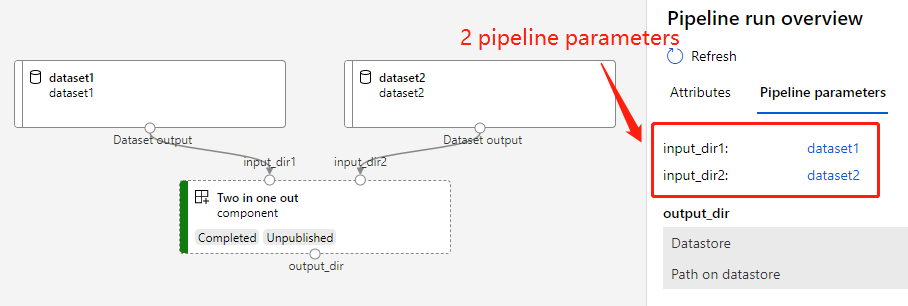
# This pipeline will have 2 parameters 'input_dir1', 'input_dir2' and each of them is linked to the corresponding component parameter.
pipeline = merge_dataset_pipeline(input_dir1=dataset1, input_dir2=dataset2)
# Submit pipeline
pipeline.submit()
The graph of pipeline:
Non-PipelineParameter
What is Non-PipelineParameter and what’s the difference with PipelineParameter?
Non-PipelineParameter is used for building pipelines dynamically. Parameter defined as Non-PipelineParameter must be a parameter of dsl.pipeline function, which controls how the pipeline is created, but will not exist as PipelineParameter in final submitted pipeline graph.
Supported types
Non-PipelineParameter does not have the supported type limitation of PipelineParameter, it supports any type in Python.
Note: Azure ML currently only support static graph, input port could not be placed in Non-PipelineParameters which will make it a dynamic graph.
Use Non-PipelineParameter
The usage of Non-PipelineParameter is similar with PipelineParameter. It defines in dsl function’s signature, and declared in dsl.pipeline with non_pipeline_parameters. Below is an example:
from azure.ml.component import dsl, Pipeline

# `input_data_dict` is Non-PipelineParameter, `process_method` is PipelineParameter
@dsl.pipeline(non_pipeline_parameters=["input_data_dict"], default_compute_target="aml-compute")
def data_processing_pipeline_with_multi_sources(input_data_dict: dict[str, any], process_method) -> Pipeline:
    pipeline_outputs = {}
    for data_type, data in input_data_dict.items():
        component = data_prepare_component_func(
            input_data_type=data_type,
            input_data=data,
            data_process_method=process_method
        )
        # Use "comment" to tag the node
        component.comment = data_type
        pipeline_outputs.update(
            {data_type: component.outputs.output_data}
        )
    return pipeline_outputs

# Create pipeline
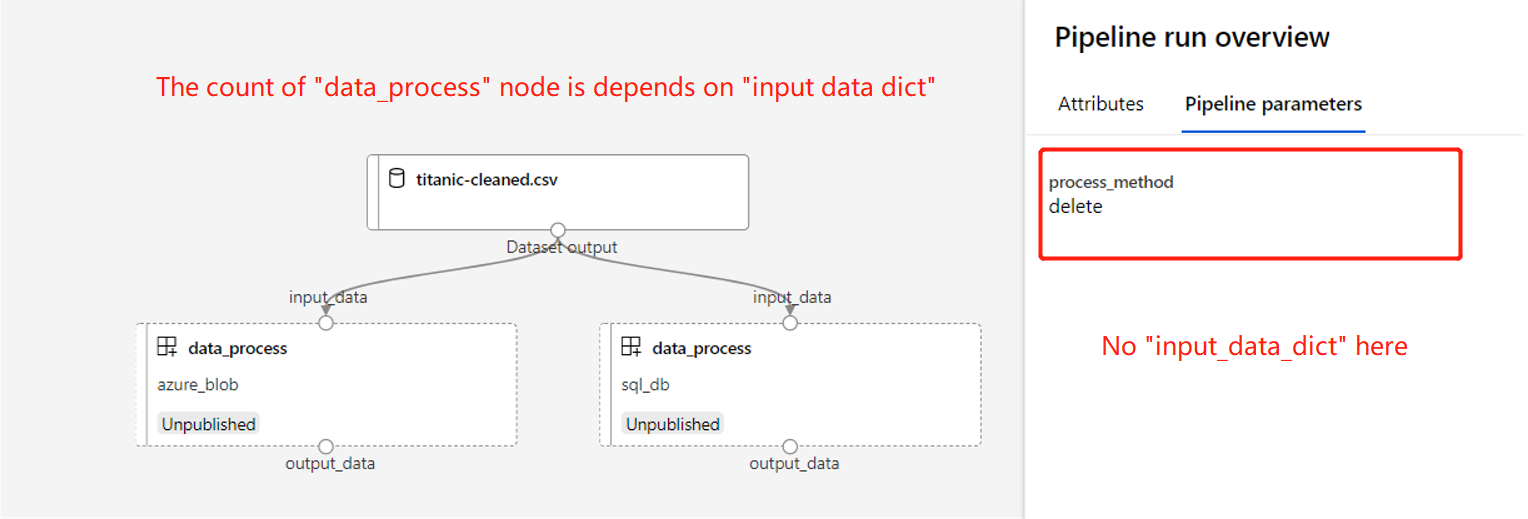
# This pipeline will have 2 component nodes, the node count is depends on `input_data_dict`
pipeline = data_processing_pipeline_with_multi_sources(
    input_data_dict={
        "azure_blob": blob_data,
        "sql_db": sql_db_data
    },
    process_method="copy"
)

# Submit with a different `process_method`
pipeline.submit(
    experiment_name="data_processing",
    pipeline_parameters={
        "process_method": "delete"
    }
)
Above pipeline will look like:
See the sample notebook here.
More scenarios with Non-PipelineParameter
Pipeline created from dynamic workspace
from azure.ml.component import dsl, Component, Pipeline

@dsl.pipeline(non_pipeline_parameters=["workspace"])
def data_processing_pipeline(workspace, compute_name) -> Pipeline:
    # Create components in workspace
    preprocess_func = Component.from_yaml(workspace=workspace, yaml_file=preprocess_yaml)
    data_process_func = Component.from_yaml(workspace=workspace, yaml_file=data_process_yaml)
    # Consume components
    preprocess_component = preprocess_func()
    preprocess_component.runsettings.target = compute_name
    data_process_component = data_process_func(input_data=preprocess_component.outputs.dataset)
    data_process_component.runsettings.target = compute_name
    return data_process_component.outputs

# Use above pipeline in different workspaces
pipeline1 = data_processing_pipeline(workspace=my_workspace, compute_name=compute_in_my_workspace)
pipeline2 = data_processing_pipeline(workspace=my_another_workspace, compute_name=compute_in_my_another_workspace)
Pipeline with dynamic component
from azure.ml.component import dsl, Pipeline

@dsl.pipeline(non_pipeline_parameters=["training_component_func"])
def training_pipeline(input_data, training_component_func) -> Pipeline:
    data_process_component = data_process_func(input_data=input_data)
    training_component = training_component_func(dataset=data_process_component.outputs.dataset)
    score_component = score_func(model=training_component.outputs.model)
    evaluate_component = eval_func(dataset=score_component.outputs.scored_dataset)
    return evaluate_component.outputs

# Use above pipeline with different training_component_func
pipeline1 = training_pipeline(
    input_data=dataset,
    training_component_func=linear_regression_component_func
)
pipeline2 = training_pipeline(
    input_data=dataset,
    training_component_func=two_class_boosted_decision_tree_component_func
)
Pipeline with recursive sub pipelines
@dsl.pipeline(non_pipeline_parameters=["depth"], default_compute_target="aml-compute")
def recursive_pipeline(depth) -> Pipeline:
    if depth == 0:
        component = data_process_component_func(input_data=dataset)
        return component.outputs
    else:
        depth -= 1
        return recursive_pipeline(depth).outputs

# Recursive pipeline with 5 depth
pipeline = recursive_pipeline(5)
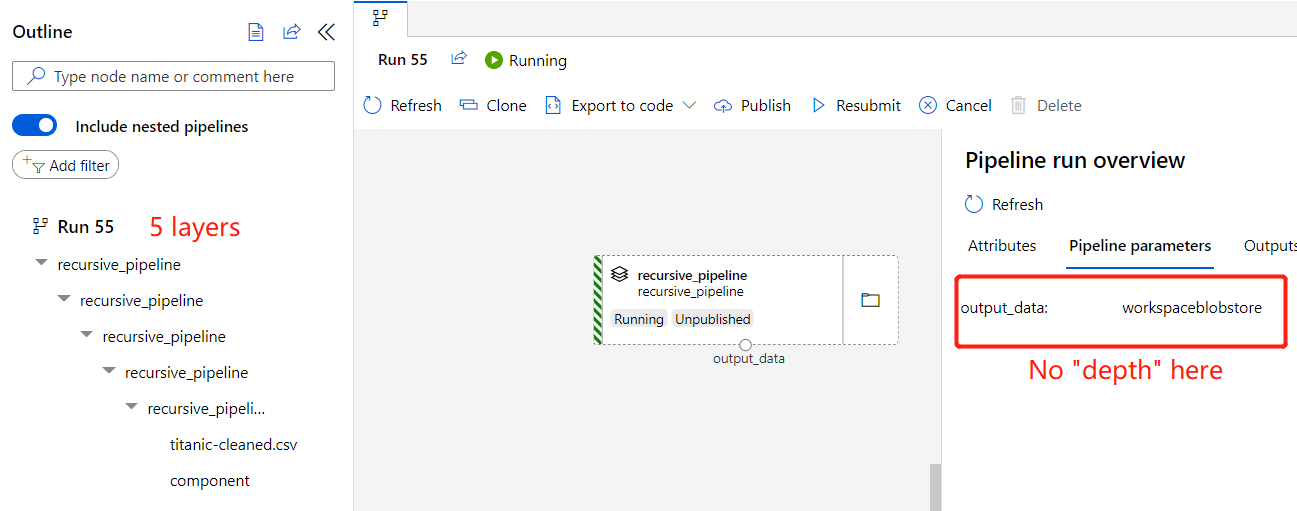
Above pipeline will look like: