PipelineExpression
What is PipelineExpression?
PipelineExpression enables users to use simple expressions (e.g. x + y) to do trivial parameter transformations tasks. It is heavy to create a custom component to do the same job, therefore PipelineExpression shows up and takes over this and users can leverage it in a very convenient way.
Supported Operators
Numerical
| Operator | Description | Operator Example |
|---|---|---|
+ |
Add | x + 42 |
- |
Subtract | x - 42 |
* |
Multiply | x * 42 |
/ |
Divide | x / 42 |
% |
Modulo | x % 42 |
** |
Exponentiation | x ** 42 |
// |
Floor division | x // 42 |
Comparison
| Operator | Description | Operator Example |
|---|---|---|
< |
Less than | x < 42 |
> |
Greater than | x > 42 |
<= |
Less than or equal to | x <= 42 |
>= |
Greater than or equal to | x >= 42 |
== |
Equal to | x == 42 |
!= |
Not equal to | x != 42 |
Bitwise
| Operator | Description | Operator Example |
|---|---|---|
& |
Bitwise AND | x & 42 |
| |
Bitwise OR | x | 42 |
^ |
Bitwise XOR | x ^ 42 |
Supported Operands
| Type | Description |
|---|---|
bool |
Python built-in type for truth value |
int |
Python built-in type for integers |
float |
Python built-in type for floating point numbers |
str |
Python built-in type for textual data |
PipelineParameter |
PipelineParameter in Component SDK |
Output |
Output in Component SDK |
PipelineExpression |
PipelineExpression in Component SDK |
Use PipelineExpression
Basic Usage
In the sample pipeline below, there are two PipelineParameters, int_param and float_param, they can be performed with supportable operators and consumed by defined CommandComponent.
from azure.ml.component import dsl


# define a simple CommandComponent
@dsl.command_component()
def simple_component_func(bool_param: bool):
    print('[simple_component_func] bool_param:', bool_param)


# define a pipeline with PipelineParameters
@dsl.pipeline(name="basic_pipeline_with_expression",
              default_compute_target='aml-compute')
def pipeline_with_expression(int_param: int, float_param: float):
    # operation between PipelineParameter and constant
    node1 = simple_component_func(bool_param=(int_param == 42))
    # operation between PipelineParameters
    node2 = simple_component_func(bool_param=(int_param < float_param))
    # operation between PipelineExpression and PipelineParameter
    node3 = simple_component_func(bool_param=((int_param * 2) >= float_param))

# create a pipeline instance and submit
pipeline = pipeline_with_expression(int_param=42, float_param=3.14)
pipeline.submit(workspace=ws)
Once submit the above pipeline and check its run in Microsoft Azure Machine Learning Studio page, you will see the following graph.
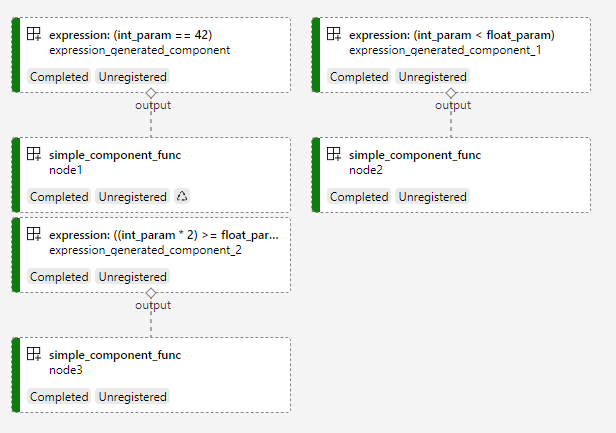
Although there are only three components defined in pipeline, we can observe SIX but not THREE components displayed in graph. These three unexpected components are created by PipelineExpression background and perform the transformations tasks.
ParameterGroup and Non-PipelineParameter
ParameterGroup and Non-PipelineParameter are two types related to PipelineParameter in Component SDK. As PipelineExpression consumes every PipelineParameter, paramaters in ParameterGroup are also supported in operations while Non-PipelineParameter are not.
@dsl.parameter_group
class ParameterGroup:
    float_param1: float
    float_param2: float = 3.14


@dsl.pipeline(name="pipeline_with_parameter_group_and_non_pipeline_parameter",
              non_pipeline_parameters=['int_param'],
              default_compute_target='aml-compute')
def pipeline_func(int_param: int, parameter_group: ParameterGroup):
    node1 = simple_component_func(bool_param=(int_param == 42))
    expression = parameter_group.float_param1 == parameter_group.float_param2
    node2 = simple_component_func(bool_param=expression)

# create a pipeline instance and submit
pipeline = pipeline_func(int_param=7, parameter_group=ParameterGroup(float_param1=0.0))
pipeline.submit(workspace=ws)
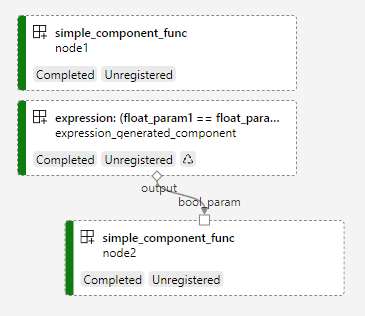
Non-PipelineParameter will be evaluated at client-side pipeline build time, therefore as the above graph illustrated, expression int_param == 42 does not create extra component as int_param is defined as Non-PipelineParameter in dsl.pipeline(); while expression parameter_group.float_param1 == parameter_group.float_param2 does create extra component due to these two come from ParameterGroup and they are PipelineParameters indeed.
Output in PipelineExpression
Output from components can be used in PipelineExpression as well.
from dataclasses import dataclass

from azure.ml.component import Component
from azure.ml.component.dsl.types import Boolean


@dataclass
class Outputs(Component):
    output1: Boolean(is_control=True)
    output2: Boolean(is_control=True)


@dsl.command_component()
def hello_world_func1(bool_param: bool) -> Outputs:
    print('[hello_world_func1] bool parameter:', bool_param)
    return Outputs(bool_param, bool_param)


@dsl.command_component()
def hello_world_func2(bool_param: bool):
    print('[hello_world_func2] bool parameter:', bool_param)


@dsl.pipeline(name="pipeline_with_output_in_expression",
              default_compute_target='aml-compute')
def conditional_pipeline_func(str_param1: str, str_param2: str = 'str_param2', str_param3='str_param3'):
    node1 = hello_world_func1(bool_param=((str_param1 + str_param2) == 'string'))  # expression1
    node2 = hello_world_func1(bool_param=((str_param2 + str_param3) == 'string'))  # expression2
    hello_world_func2(bool_param=(node1.outputs.output1 != node2.outputs.output2))  # expression3

# create a pipeline instance and submit
pipeline = conditional_pipeline_func(str_param1='str', str_param2='ing')
pipeline.submit(workspace=ws)
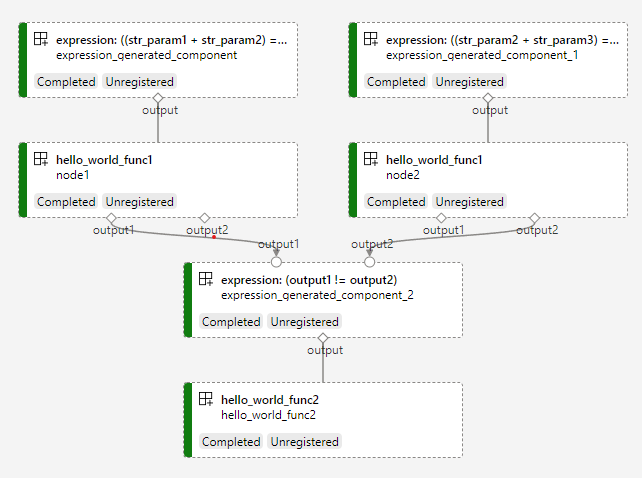
Above pipeline defines third expression using outputs of two previous components, and the graph clearly display the topology.
Bool Test
Suppose expr is an expression (numeric or boolean), common bool test syntax may look like bool(expr >= threshold) or if expression: .... However, this won’t work for PipelineExpression without any change. PipelineExpressoin is designed to record operation history, while Python’s __bool__ method only return False or True, which breaks the history inside PipelineExpression. Therefore you CANNOT execute bool test statically and locally with PipelineExpression.
To work around this, you can leverage dsl.condition() (e.g. dsl.condition(condition=(expr >= threshold), ...)) to create runtime If-Else pipeline for bool test. Refer to Control Flow for more details.
Restrictions
Please add explicit and precise type annotation in pipeline declaration for PipelineParameters participated in operations, otherwise an exception during operation will be thrown for this.
When PipelineExpression is consumed by components as input/parameter, type of expression result should be boolean, otherwise the pipeline will execute in wrong topology and exceptions are expected to thrown.