Scope Component
Overivew
A ScopeComponent is a component that can be used to submit cosmos scope jobs on virtual clusters which have been migrated Azure Data Lake (ADL)
Prerequisites
Before using scope component, you should be familiar with:
To submit and run the scope job in virtual cluster successfully, you should have below access:
For office users, please request to join office_adhoc_RW_readers SG.
Scenarios
Run your cosmos scope jobs in Azure ML.
Limitation
Only Dataset is supported as component’s input.
OBO flow only works for individual user, not for service principal.
How to write ScopeComponent yaml spec
Please refer to ScopeComponent spec doc.
Please refer to ScopeComponent Schema.
Example yaml:
$schema: https://componentsdk.azureedge.net/jsonschema/ScopeComponent.json

name: bing.relevance.convert2ss
version: 0.0.1
display_name: Convert Text to StructureStream

type: ScopeComponent

is_deterministic: True

tags:
  org: bing
  project: relevance

description: Convert ADLS test data to SS format

inputs:
  TextData:
    type: [AnyFile, AnyDirectory]
    description: text file on ADLS storage
  ExtractionClause:
    type: string
    description: the extraction clause, something like "column1:string, column2:int"
outputs:
  SSPath:
    type: CosmosStructuredStream
    description: output path of ss

code: ./

scope:
  script: convert2ss.script
  # to reference the inputs/outputs in your script
  # you must define the argument name of your intpus/outputs in args section
  # Both 'argument_name {inputs.input_name}' and 'argument_name={inputs.input_name}' are supported
  # for example, if you define your args as below, you can use @@Input_TextData@@ to refer to your component's input TextData
  args: >-
    Input_TextData {inputs.TextData}
    ExtractionClause={inputs.ExtractionClause}
    Output_SSPath {outputs.SSPath}
Note: Customer can use
@@name@@syntax in scope script to refer to inputs and outputs.
if
nameis the argument name of an inputPath or outputPath, any occurrences of@@name@@in the script are replaced with actual data path of corresponding port binding. And typeCosmosStructuredStreamis used to hint service to generate data path end up with.ss.if
nameis the argument name of aninputValue, any occurrences of@@name@@will be replaced with corresponding value of the parameter.
convert2ss.script
#DECLARE Output_stream string = @@Output_SSPath@@;
#DECLARE In_Data string =@"@@Input_TextData@@";

RawData = EXTRACT @@ExtractionClause@@ FROM @In_Data
USING DefaultTextExtractor();

OUTPUT RawData TO SSTREAM @Output_stream;
See more examples in github samples repo.
Follow how to access instructions if you meet 404 error when accessing the samples.
Dynamic Resources
Resources usually are data files feed into the Scope Component as input data and are used in the Scope script for the job. It can be defined in a DataSet. It can also be an output from a previous module and then feed into next module. Scope Cloud supports resources from either ADL or Blob storage for jobs submitted through AML. User who submits the job must have permission to access the data storage.
How to mark a scope component input as resource
Specify the property is_resource to true (default value is false) for the input. e.g.
Specify the property is_resource to true (default value is false) for the input. e.g.
inputs:
  RawData:
    type: CosmosStructuredStream
    description: raw ss to filter out
    optional: false
  FilterMap:
    type: AnyDirectory
    description: rows to remain
    is_resource: true
    optional: false
To specify a resource in DataSet, the relative file path in the storage needs to be specified.
data set name: “MyResourceData”,
path on datastore: “local/temp/juwang/abc.txt”
How to consume the resource in scope script.
In the Scope script, the same name needs to be referenced. For example:
RESOURCE @@MyResourceData@@;
Resources usaully are consumed as UDO or with C# code. Details can be found from Resource Please refer to more examples in github samples repo.
Resource in a folder
The resource can be under a folder. For example, if you specify the file path as
path on datastore=”local/temp/juwang/”
All the files under that folder including subfolders will be downloaded and flatten on the current working directory.
For example:
The files under the folder are like:
local/temp/juwang/file1.txt
local/temp/juwang/subFolder1/file11.dat
local/temp/juwang/subFolder2/file21.zip
All those files will be downloaded from the remote storage and dropped at the curent working directory with the subfolder names in the file names.
MyResourceData-file1.txt
MyResourceData-subFolder1-file11.dat
MyResourceData-subFolder2-file21.zip
And the @@MyResourceData@@ in the script will be replaced as:
“MyResourceData-file1.txt”,”MyResourceData-subFolder1-file11.dat”,”MyResourceData-subFolder2-file21.zip”
Size limits
A single resource may be no more than 400MiB.
The total limit for all resources for a single job is 3GiB.
Samples
How to use scope component - Demonstrates how to use scope component to run cosmos scope jobs.
FAQ
Why do I get warnings Your azureml-core does not support OBO token when submit pipeline ?
To make backend submit scope job to virtual cluster with OBO(On-Behalf-Of) flow, we need to fetch azureml client token through azureml-core package at first.
If your azureml.core does not support to fetch azureml client token, you will get this warning and the scope job will be submitted in non OBO flow.
Please upgrade your azureml.core to v1.27.0 or above.
pip install 'azureml-core>=1.27.0'
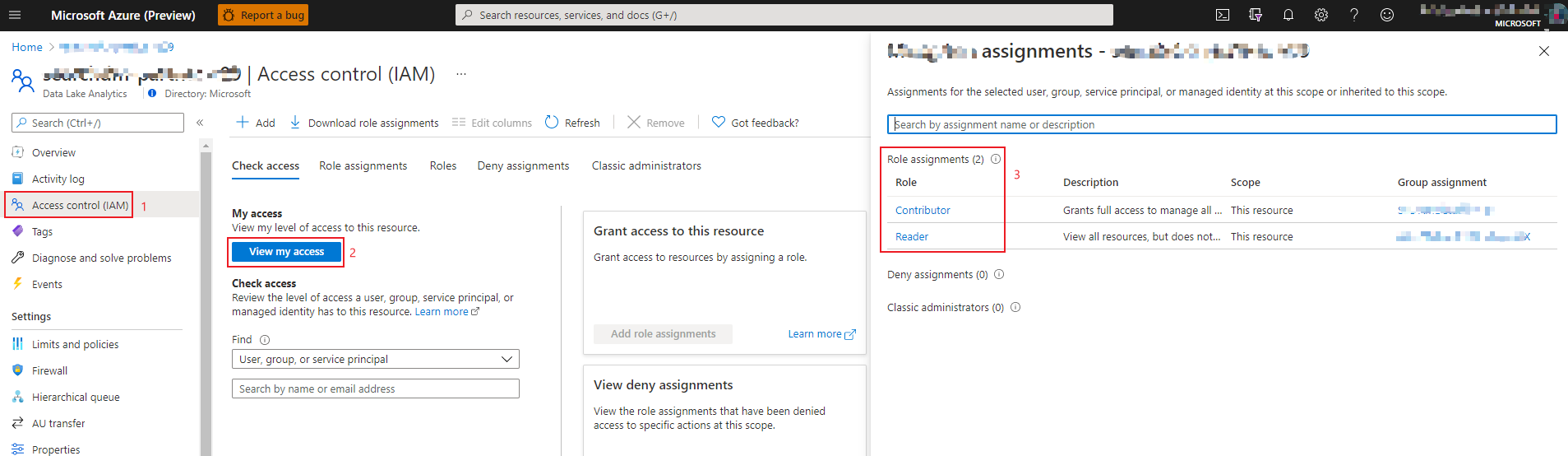
How to check my role in ADLA
Login to Azure portal and open ‘Access control’ panel of your ADLA.
Click ‘View my access’ button.
Check your role assignment in the right panel.
How to check my role in ADLS
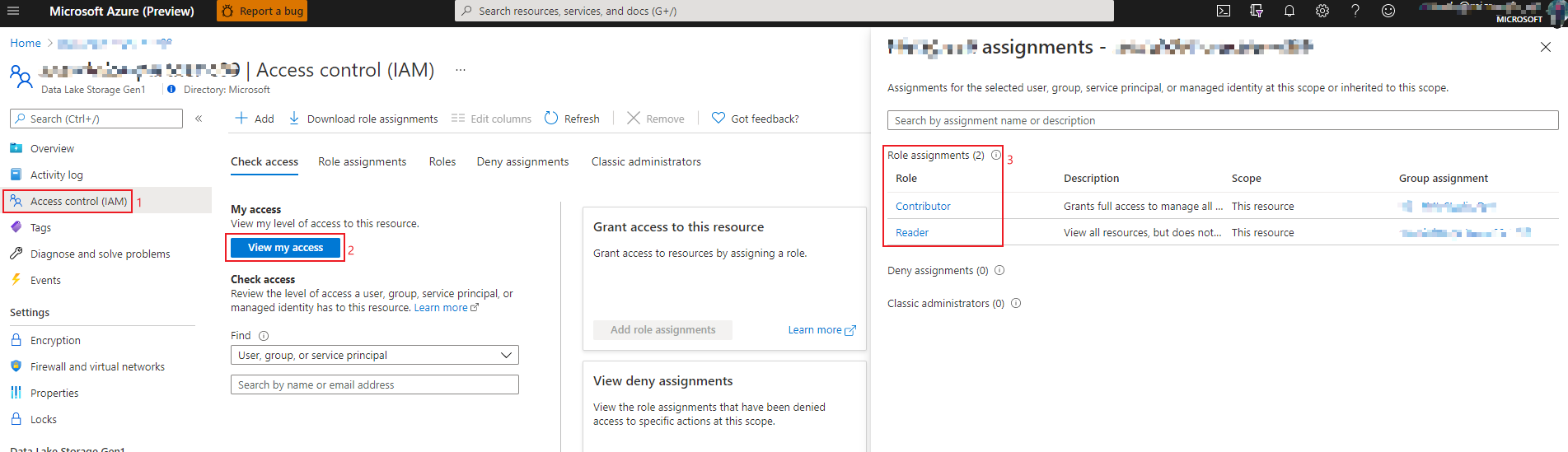
Login to Azure portal and open ‘Access control’ panel of your ADLS.
Click ‘View my access’ button.
Check your role assignment in the right panel.
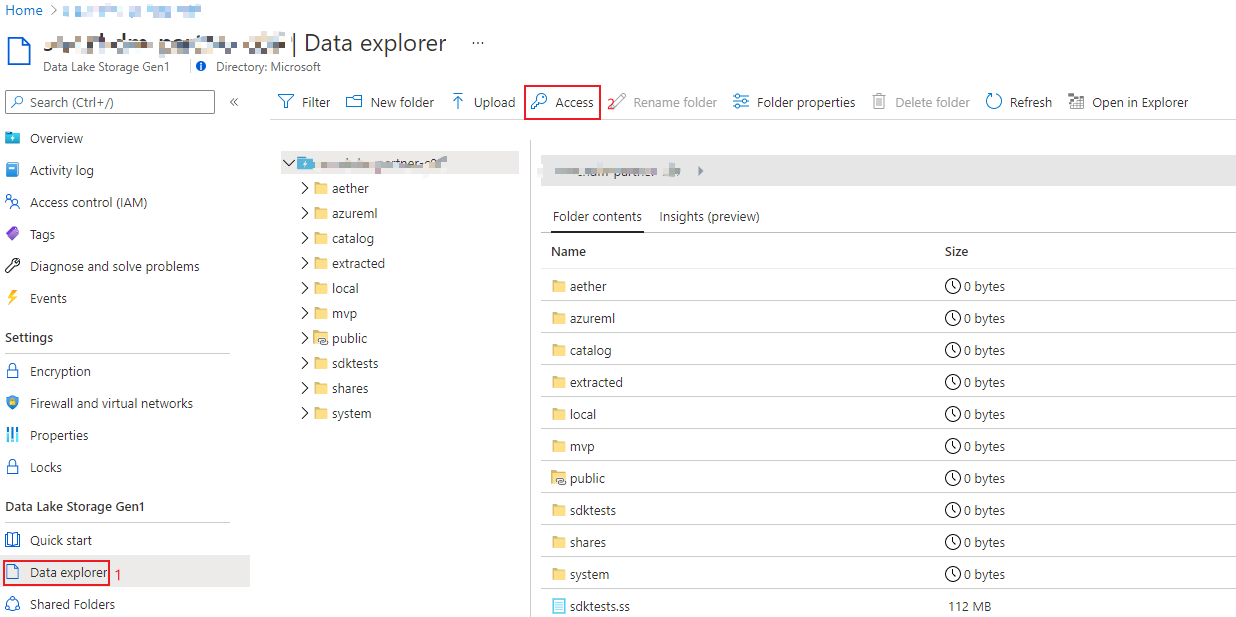
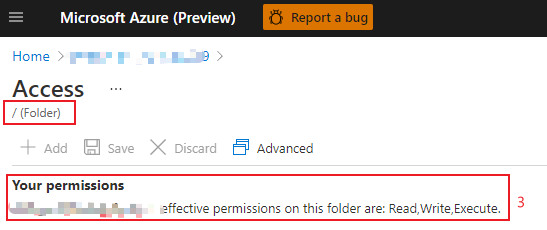
How to check my access in ADLS data explorer
Login to Azure portal and open ‘Data explorer’ panel of your ADLS.
Click ‘Access’ button.
Check your access of the root folder.