AE365ExePool Component
Overview
An AE365ExePool Component is a component that can be used to submit job to AE365ExePool in AP environment. This component is for Microsoft internal only. This component is in private preview, please play it around and share feedback with us.
Prerequisites
Before using AE365ExePool component, you should be familiar with:
To submit and run a AE365ExePool job successfully, you should have below access:
Scenarios
The component is used to trigger UHRS eyes-on annotation workflow only.
Limitation
AzureML AE365ExePool module must reference AEther AE365ExePool module. Currently only CAX EyesOn Module [ND] v1.6 (654ec0ba-bed3-48eb-a594-efd0e9275e0d) is supported.
The “TimeoutSeconds” parameter is read from content of input port in AEther module. However, the “input as parameter” feature is not supported in AzureML yet, thus you need to fill in parameter manually.
AzureML will use prefix of user’s AAD mail address as job requestor, which has a small chance to be different from alias used in AEther Client. This may have effect on auto-approval, please contact MARS administrator for help if it happens to be the case.
The inputs/outputs data must reside in Azure Data Lake on Cosmos directly or indirectly under “local” folder.
How to write AE365ExePoolComponent yaml spec
Please refer to AE365ExePoolComponent spec doc.
Example yaml:
$schema: https://componentsdk.azureedge.net/jsonschema/AE365ExePoolComponent.json
name: microsoft.com.azureml.samples.ae365exepool.CAXEyesOnModule
version: 0.0.1
display_name: CAX EyesOn Module [ND] v1.6
type: AE365ExePoolComponent
description: Use this auto-approved module to download data on EyesOn machine and interact with it for Compliant Annotation purpose.
tags: {category: Component Tutorial, contact: amldesigner@microsoft.com}
inputs:
  ComplianceCluster:
    type: string
    description: compliance cluster name
    default: "MsResearch-EyesOn-Annotation"
    optional: false
  HeronId:
    type: string
    description: Heron ID
    default: ""
    optional: false
  localoutputfolderEnc:
    type: string
    description: local output folder for encrypted data
    default: ""
    optional: true
  localoutputfolderDec:
    type: string
    description: local output folder for decrypted data
    default: ""
    optional: true
  TimeoutSeconds:
    type: integer
    description: timeout in seconds
    default: 500000
    optional: true
  hitappid:
    type: integer
    description: hitapp id
    default: 31346
    optional: true
  projectname:
    type: string
    description: project name
    default: "LatestE2Etemplate"
    optional: true
  judges:
    type: string
    description: judges
    default: "juwang;bradwall"
    optional: true
  annotationsMayIncludeCustomerContent:
    type: string
    description: annotations may include customer content
    default: "1"
    optional: true
  TaskGroupId:
    type: integer
    description: task group id
    default: 86891
    optional: true
  GoldHitRTADataType:
    type: enum
    description: gold hit rta data type
    enum:
    - Gold
    - RTA
    - Qualification
    - Preview
    default: ""
    optional: true
  taskFileTimestamp:
    type: string
    description: task file timestamp
    default: "2021.12.21.23.55.00"
    optional: true
  DataToLookAt:
    type: AnyFile
    optional: false
  GoldHitRTAData:
    type: AnyFile
    optional: true
outputs:
  outputfolderEnc:
    type: AnyDirectory
  outputfolderDec:
    type: AnyDirectory
  OriginalHitData:
    type: AnyDirectory
command: >-
  cax.eyesonmodule.exe input={inputs.DataToLookAt} inputGoldHitRta=[{inputs.GoldHitRTAData}]
  localoutputfolderEnc=[{inputs.localoutputfolderEnc}] localoutputfolderDec=[{inputs.localoutputfolderDec}]
  timeoutSeconds=[{inputs.TimeoutSeconds}] hitappid=[{inputs.hitappid}] projectname=[{inputs.projectname}]
  judges=[{inputs.judges}] outputfolderEnc={outputs.outputfolderEnc} outputfolderDec={outputs.outputfolderDec}
  annotationsMayIncludeCustomerContent=[{inputs.annotationsMayIncludeCustomerContent}] taskGroupId=[{inputs.TaskGroupId}]
  goldHitRTADataType=[{inputs.GoldHitRTADataType}] outputfolderForOriginalHitData={outputs.OriginalHitData}
  taskFileTimestamp=[{inputs.taskFileTimestamp}]
ae365exepool:
  ref_id: 654ec0ba-bed3-48eb-a594-efd0e9275e0d
Note: “type” of each input/output must be aligned with the corresponding port in AEther module. AnyFile for file port and AnyDirectory for directory port.
See more examples in github samples repo.
Follow how to access instructions if you meet 404 error when accessing the samples.
Inputs
Inputs are data files feed into the AE365ExePool Component and used in the command. It can be defined in a DataSet/DataReference or provided as output from a previous module. AE365ExePool only supports input from Azure Data Lake on Cosmos. User who submits the job must have permission to access the data storage.
Samples
How to use ae365exepool component - Demonstrates how to use AE365ExePool component to run a CAX EyesOn job.
FAQ
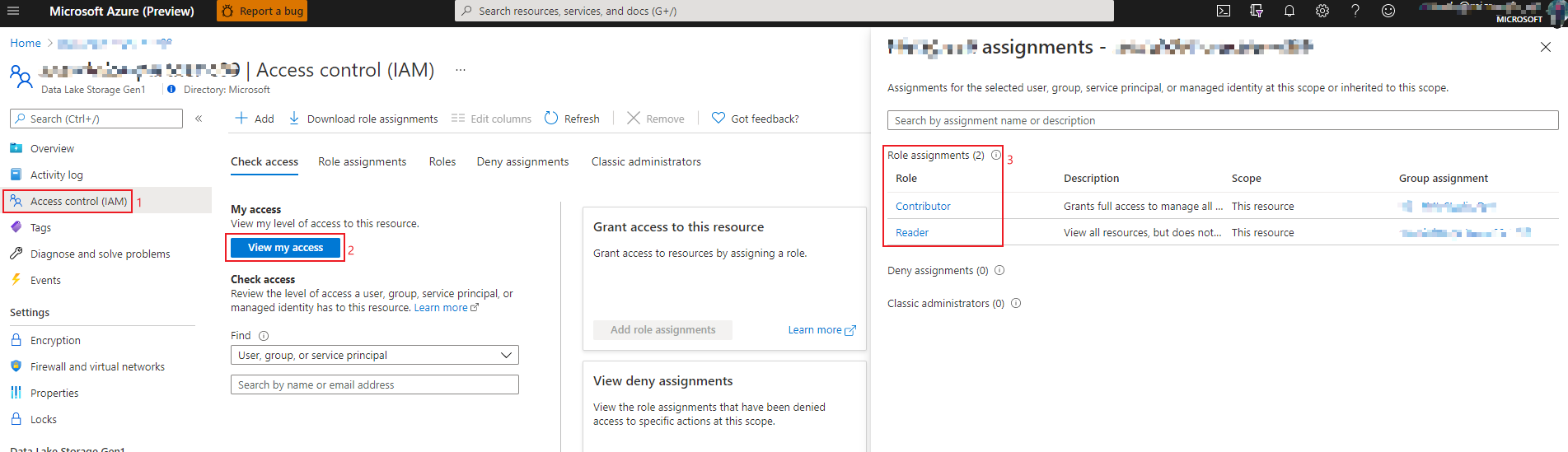
How to check my role in ADLS
Login to Azure portal and open ‘Access control’ panel of your ADLS.
Click ‘View my access’ button.
Check your role assignment in the right panel.
How to check my access in ADLS data explorer
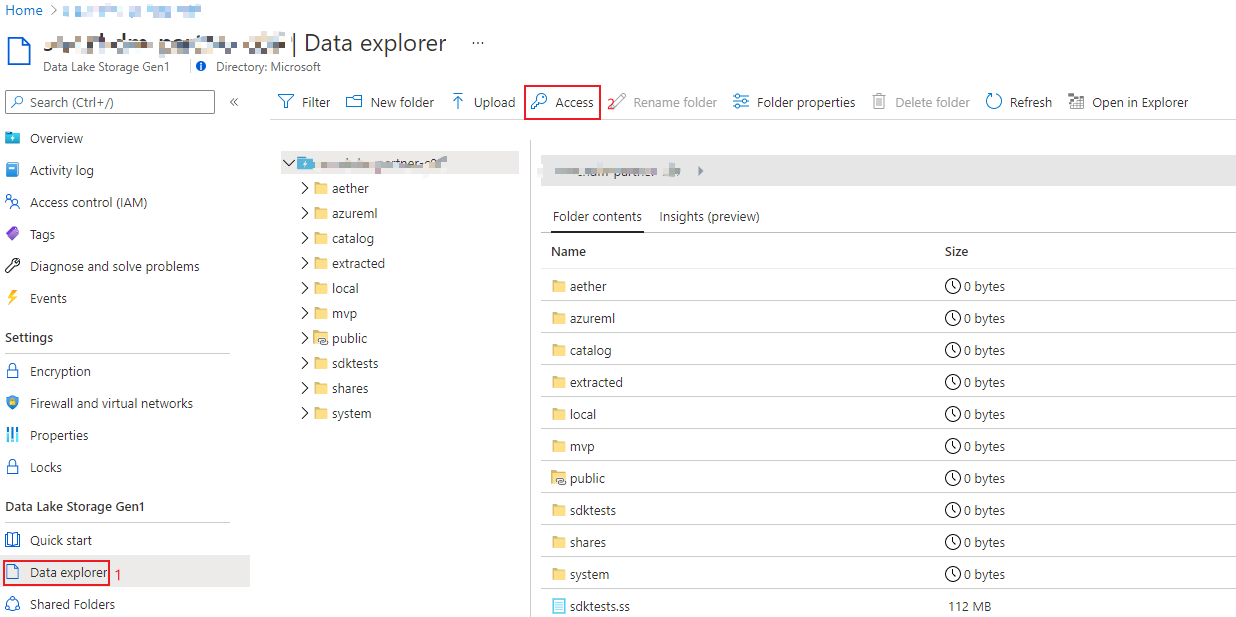
Login to Azure portal and open ‘Data explorer’ panel of your ADLS.
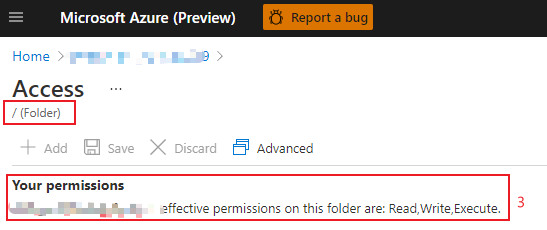
Click ‘Access’ button.
Check your access of the root folder.